1. Building one skill at a time takes too long
Tommy went for coffee and decided to change the subject — it was time to let everything settle in his head. The landing page can wait — Tommy has a bigger question now. Yesterday he added one skill to the AI agent, for design, and it got noticeably better. And now he is wondering: can it somehow get even cooler? You cannot keep adding one skill at a time every time.
“Listen, about this skill,” Tommy says as he walks in. “Yesterday I installed one, and it helped a lot. So I figured there are a lot of such skills. I would like to install all the most popular ones at once and see how it goes. But will they get in each other’s way? I really do not feel like dealing with the setup for each one right now.”
“Oh, that is a good approach.” Alex nods. “And you are in luck: you can do it all at once. Building up an arsenal one skill at a time is really slow. One skill for design, another for copy, a third for something else. You will spend the whole day on it. But there are ready-made bundles — several skills in one package, already tuned to each other, and they do not conflict. Install one thing — and the AI agent is ready to cover the whole topic for you.”
“That sounds very interesting. And promising. Can you give me more details?”
“Sure. This group of skills is called a plugin. You have already heard the word, by the way — when you installed the JavaRush platform plugin and the Claude Code plugin in IDEA. There the plugin was an add-on for the editor. Here it is a Claude Code plugin, an add-on for the AI agent itself. The idea is the same: you attach it not to a program, but to the AI.”
2. A plugin is an all-inclusive toolbox
“Let us separate two things so we do not mix them up,” Alex continues. “A skill is one ability. One capability you added to the agent. And a plugin is a group of skills for one topic, gathered together: several skills, ready-made helpers, auto-reflexes, sometimes integrations with external services, and their own slash commands — all for one topic at once. You do not assemble the rig bolt by bolt — you install the entire toolbox with one command.”
He finds an analogy:
“Imagine a drill. A skill is one attachment for it. Useful, but just one. And a plugin is a whole toolbox: the drill itself, all the attachments for different holes, the charger, everything for a specific job and matched to each other. Open the box — and you instantly have everything you need; you do not run around buying one attachment at a time.”

Programmers have been using this approach for decades. First they write separate functions or classes — those are skills. Then they combine them into libraries for a specific task — and that is already a plugin. Maybe plugin is not the best word, but it stuck. So, in practice, these are synonyms: a library of skills is a plugin for Claude Code.
Tommy tries to restate it in his own words:
“So a skill is one tool, and a plugin is a whole toolbox for a specific topic that I attach to Claude Code all at once.”
“Exactly. A plugin is the whole box in one command.”
3. Where plugins come from and how to install them
“And where do people get these boxes in the first place?” Tommy decided to move from theory to practice.
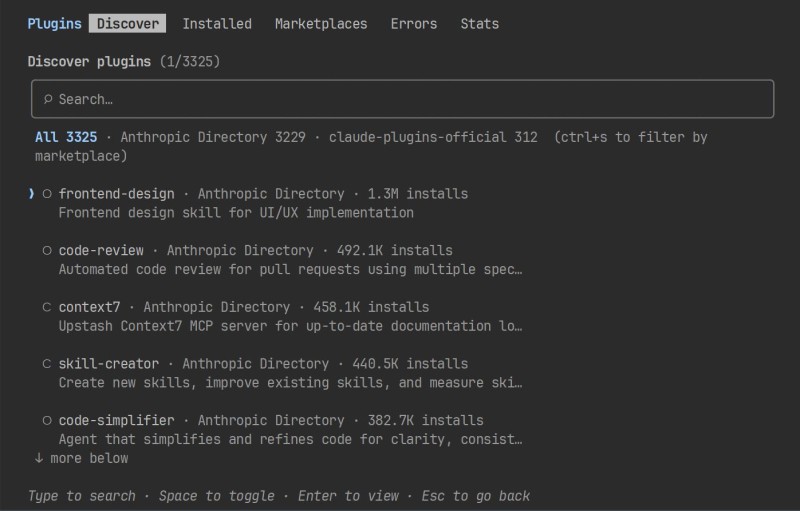
“Plugins are stored in plugin catalogs, called a marketplace in English.” Alex opens the session. “Working with them is simple, in two steps: first you connect the plugin catalog, then you install the plugin you need from it. Right in the session, using slash commands. Look at how it works with any plugin.”
He shows four lines:
/plugin marketplace add anthropics/claude-plugins-community   # connect the plugin catalog
/plugin install plugin-name@claude-community                  # install a plugin for a topic
/reload-plugins                                               # enable it in this session
/plugin list                                                  # check: the plugin is in the list
“Let us break down each line,” Alex suggests, not letting Tommy sink. “The first one, /plugin marketplace add, means ‘connect the plugin catalog.’ You specify the full repository name, this one, anthropics/claude-plugins-community, is the community’s public catalog. It gets a short alias — claude-community — and you use that one from then on.”
“Are there many such catalogs?”
“Tons already. There is an official one from Anthropic, the creators of Claude Code — it is built in, so you do not need to connect it; it is already there, and the plugins in it are reliable. And there are community catalogs made by other developers. There is more choice, but the quality varies too: treat a third-party catalog like anything else from the internet — install it from a source you trust.”

“Okay. And the second command?”
“/plugin install — install a specific plugin. The name of the plugin is on the left, and after the at sign on the right is the short catalog alias, claude-community. So: ‘install this plugin for me from this catalog.’”
“And why do we need /reload-plugins?”
“Downloading a plugin to disk does not mean it is enabled yet. This line tells the agent: ‘pick up what just arrived, right now, in this session.’ If you do not do that, the plugin sits installed, but the agent does not see its skills: you call for it, and it keeps working the old way. Skills that you place in the project by hand are noticed by the agent automatically; but what came from the catalog has to be enabled with this command. The fourth one, /plugin list, is just to make sure it installed and is in the list of installed plugins.”
“So, does one plugin really contain that much useful stuff?”
“That is the whole trick. A plugin brings in several skills at once — not like a single skill last time, but a group for one topic. You can see the effect on something simple. Even on a business card page. Ask the AI agent:”
Create a simple personal profile page for me, nicely.“And the agent applies the whole bundle of skills from the plugin at once. The result is coherent and ‘expensive-looking,’ not a default gray draft. That is the difference. Yesterday you added one skill to the AI agent. Now — an entire plugin, the whole topic in one command. And the result will be noticeably stronger.”
Tommy looks at the neat business card page built from nothing and gets that same “wonder shop” feeling — as if he walked in and stocked up on a whole arsenal of artifacts. He is not experimenting on his own landing page yet, just on a small test case — but he can already see the mechanism through and through: connect a catalog, install a plugin, and the AI agent levels up on the topic as a whole.
“One small thing for the future,” Alex adds. “A plugin adds its own commands with a prefix, through a namespace — something like /plugin:something. That is so commands from different plugins do not get mixed up. It is not very important right now; just remember it for later.”
4. Bonus: “make it from an image”
Tommy remembers his unresolved task — the one with the reference screenshot.
“Listen, what about the image? You promised to show a trick. I have a sample in the form of a screenshot, but the agent works with text. How is it supposed to understand it?”
“You do not really need to make it understand that by hand.” Alex almost laughs. “Watch this trick. You throw any screenshot at the agent:”
Make a page similar to this screenshot. [attach an image]“And the agent builds a similar page from the image. You drop in a screenshot — you get a similar layout.”
“Hold on, does it actually see the image? With eyes? You said it only works with text.”
“Slow down on the excitement here.” Alex does not let him drift into the weeds. “It sees it — in a certain sense, yes. But how exactly that is implemented technically — we are not going into that today. Sam will do everything for you now: where needed, it will extract a verbal description from the image itself and pass it on to the rest of the work. You do not need to do anything.”
“So the trick exists, but we are not digging into it yet?”
“Not yet. Under the hood there is a subtle point about which model ‘can see’ images, and we will look at that deliberately much later. Today just remember the trick: drop in a screenshot — get something similar. That is your bonus for today, not a separate lecture. Of course there will be a lecture, but later.”
For Tommy this remains a pleasant wow — “it will make a landing page from a picture!” — and he is already imagining how this trick will fit the customer’s reference. But Alex is right: right now this is just a clever trick, not a lesson.
5. Ready-made tools at work
“In short, here is what should now be in your head,” Alex sums it up, not as a list but on his fingers. “A skill is one capability; that is from last time. A plugin is a group of skills for one topic, ‘all-inclusive,’ installed with one command from the plugin catalog. The mechanism is the same as with a skill — ‘install something ready-made’ — but in bulk. Plus the image trick: drop in a screenshot, get something similar.”
“So how do you use a plugin, then?” Tommy asks. “How do you call the skills inside it?”
“You do not need to call anything. Usually you just describe the task in words — the AI agent takes the needed skill from the plugin by itself. If you want a specific action, plugins can have their own commands, the ones with the prefix. But that is rare. And remember this for later too: if you hit a new topic, first check whether there is already a ready-made plugin for it in the catalogs, and only then build your own by hand. No need to reinvent the hammer.”
“So the point of all this is the same, if I understand correctly,” Tommy picks up the thread. “They are all ready-made things that I install and use. Like skills, just different ones.”
“Exactly, and that is the main thing you need to take away from our chat.” Alex is pleased. “Claude Code has a ton of such ready-made tools for all kinds of tasks. And — hold on — even putting a site online can be done through a ready-made tool, not by hand in the console. There is one for that too.”
Tommy straightens up:
“Wait. So deployment is also one of those installable things?”
“It is. And you need that right now.” Alex does not spell it out; he keeps him on the hook. “Enough practicing on business card pages. In practice we are taking something real: both a design plugin and a deployment tool — and we will use them to build your landing page step by step. So that you do not just listen, but actually do it by hand and get a live link. Let us go.”

GO TO FULL VERSION