1. What the agent still could not do: interact with a live page
The game is ready: real chess on chess.js, all seven items pass, the markers for the agent are in place. Tommy comes to Alex with it — and immediately with a catch:
“Listen, okay. The game is there, the markers are there, we have decided who the agent plays for. But who is going to move the pieces by hand? The agent lives in the terminal — how is it going to get to my board in the browser? Am I supposed to click for it with the mouse?”
“And that is where the main thing for today begins.” Alex had clearly been waiting for the question. “Remember what the agent could do so far. It read files, wrote code, even dragged earthquakes to you through the MCP cable last week. All of that is working with text: letters, data, lines on disk. But opening a page in the browser and clicking on it — pressing a button, grabbing a piece, dragging it to a square — it could not do that. It had no hands in the browser.”
“And now it will?”
“And now it will. Today the agent will learn to control a real browser. It opens the window by itself, moves the cursor by itself, clicks by itself. And I will say this honestly: it is the most impressive thing you will see here.”
2. It is the same MCP cable, only for the browser
“So what, is this some huge new thing?” Tommy is already tense, expecting a week of setup.
“Not at all.” Alex is almost pleased. “Remember, a couple of days ago we used the MCP cable to reach the earthquake service? There was a program outside, it provided data, and we connected it to the agent with the cable. Well, the browser connects exactly the same way. There is a special program — a browser with an MCP port. We connect it to the agent with the same cable — and the agent gets hands over the browser: open a page, click, type, take a screenshot.”
“So there is nothing new to learn?”
“The cable is the same, you have already learned it. The only new thing is what it is plugged into. Before, the other end was a service with data; now it is a browser you can steer. The method is the same. This browser program is called Playwright. Plug it in with the cable — and the agent gets hands in the browser.”
3. Connecting Playwright
“Enough theory.” Alex opens the terminal. “Let’s connect it. One command:”
claude mcp add playwright -- npx -y @playwright/mcp@latest“Wait, break it down word by word,” Tommy asks, looking at the line. “Because it looks complicated.”
“Not more complicated than last time.” Alex breaks it down piece by piece. “claude mcp add — that means ‘add an MCP connection’; you already did that a couple of days ago with the earthquakes. playwright — just the name I am giving this connection so I can recognize it later in the list.”
“And these two dashes?”
“-- — that is the separator. Everything to the right of it Claude does not parse as its own settings; it passes it through as the startup command: ‘take this program and run it.’ On the right is exactly that — npx -y @playwright/mcp@latest: that means ‘download the latest @playwright/mcp package from the internet and run it.’”
“And last time we wrote some --transport http. Where is it here?”
“Good question. Last time the service worked over the network — somewhere on someone else’s server, and with the --transport http flag we said: ‘the cable goes over the internet, at this address.’ But here it is different. We are not going out to the network — we are launching the browser program right on your machine, with this command after --. Since the program is local and running nearby, Claude talks to it directly, without the network, and no --transport http is needed. A local program versus a network service — that is the whole difference between the two commands.”
Alex presses Enter — the command runs. And immediately warns:
“Now the important part, do not miss it. The connection has been added to the settings, but the current session does not know about it yet. New cables are only picked up at startup — which means the session has to be restarted. But not just log out and back in from scratch, so as not to lose everything we have built here for the game. For that there is a separate flag — --continue: it will pick up the fresh cable and restore all our context. Exit the agent and run:”
claude mcp list        # check: playwright → ✓ Connected
claude --continue      # restart, picking up the cable and not losing context
“In the list, playwright should have the status ✓ Connected — that means the browser is connected and the agent can see it. If there is no status or there is an error, the first thing to do is check the command and that the package downloaded. And almost always the reason is one thing: you did not restart the session. Forget that — the agent will not pick up the connection, no matter how many times you add it.”
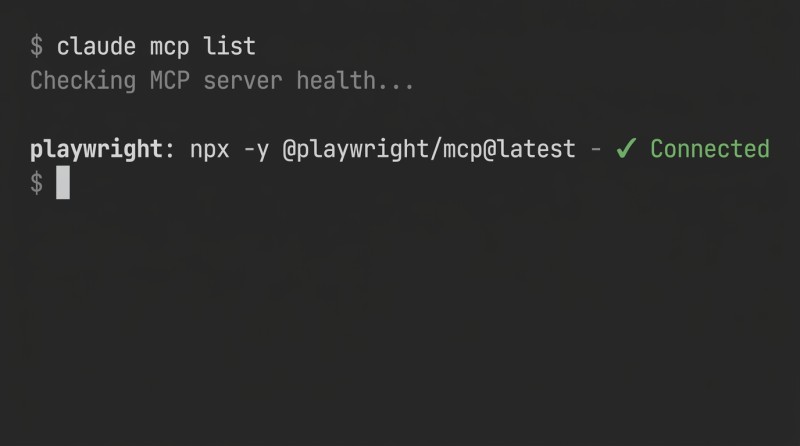
Next, already in a fresh session, let’s see what the connection gave us:
/mcp # shows the connected MCPs and their tools“/mcp will show playwright and the list of its tools: open a page, click, enter text, take a screenshot. That is what the agent can now do in the browser — each such tool is like a separate button.”
4. The agent makes its first move
“And now just ask in words.” Alex types in the session. “Just name it directly: through Playwright. If you just say ‘open the page,’ the agent might open it in a regular browser, where it cannot reach with its hands, and will be watching from the side. But we need it to open it specifically in the Playwright browser — the one it knows how to control. So we specify the name:”
Through Playwright, open my game game.html in the browser.
You are playing black. Wait until it is your turn, make a move, and send a screenshot of the board.
“And now watch the screen.” Alex does not rush him.
A second passes with nothing. Then a browser window opens by itself — that very Playwright one, where every move of the agent is visible. The board loads in it. Tommy moves a white pawn — with his own hand, he is playing white. The turn passes to black. And then the cursor in the window by itself moves over to the black pawn, clicks it, then clicks the square two ahead — the pawn steps up to face the white one. A screenshot of the board lands in the chat.
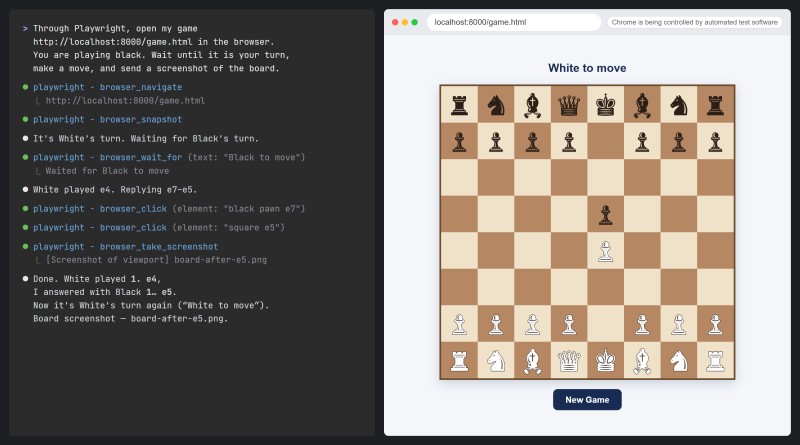
“Holy crap!” Tommy jumps up, pointing at the screen. “It really moved on its own! I did not touch anything — and the piece went!”
“On its own.” Alex smirks. “And now watch how it did it. It read the data-turn marker on the page, saw "b" — understood that it was its turn, black. It looked at the board, chose a move, clicked the piece, clicked the square. You did not touch the mouse even once. There you have it: ‘the browser came alive’ — not just in words, but right there, the window, the cursor moving by itself.”
5. /goal: the agent loops until the result
Tommy is already fired up:
“Listen, can it get even cooler? So that I do not command one move at a time, but say ‘finish the game’ — and walk away, and it keeps playing until the end by itself?”
“Yes, and for that Claude Code has a separate powerful command — /goal, a ‘goal.’ It is a cool thing, remember it. Usually this is how you work: you give the agent one step, it does it, you wait, you give the next one. But /goal turns that around. You do not give steps, you give the condition under which the job can be considered done — and you walk away.”
Then the agent keeps going in a loop by itself: made an attempt → checked whether the condition is satisfied → not satisfied, makes another one → and so on until it lines up. And it is not checking by itself on the spot: after every step, a separate invisible checker comes in (a fast model) and judges whether the goal has been reached or not. Reached — the agent stops. Just keep in mind: the checker reads only the conversation — it does not look at the page and does not open anything itself. Whatever the agent has not said in the chat does not exist for the checker. That is exactly what “set the task and walk away” means: you come back — and everything is ready.
“So this can be used for literally anything!” Tommy realizes. “Not just chess.”
“For anything, as long as you can clearly describe what ‘done’ means.” Alex nods. “And with chess we have exactly that. Remember your data-game-over marker? That is what will be useful here as the condition:”
/goal the agent read data-game-over="true" on the board and reported it in the chat — or 100 moves have been played“The agent plays move by move, and after each one it reads the marker and writes in the chat: has data-game-over become "true" yet or not. The checker sees only that record — that is why the condition says ‘reported it in the chat.’ And the second half of the condition, about the number of moves, is insurance: /goal has no built-in limit, and if the game goes in circles, the agent will just keep on moving. The game reaches checkmate, the agent reports it — the checker says ‘stop.’ And meanwhile you can go drink tea.”
Tommy is glowing:
“That is coolness squared! Not only does it move by itself — it will also carry the whole game through without me: set it, walk away, come back — done.”
“Right. And to turn off the mode when you get tired of it:”
/goal clear # remove the set goalAnd here Alex draws a fair boundary — not preaching, just pointing it out:
“Only notice one thing. The condition you entered — data-game-over — you took it ready-made. You yourself built that marker into the game when you put it together, and now you just copied it into /goal. But coming up with the condition under which a task is considered complete in the first place, so that a machine can be trusted to check it, is a separate adult skill; we will get to it much later. For now — take the ready-made condition and enjoy watching the agent loop until the result.”
“Deal.” Tommy is no longer really listening to the caveat; he is itching to start it.
6. The same browser — on any live page
“Listen,” Tommy says, thinking on the fly, “if it knows how to move through pages… that is not just about my game, right?”
“Not just that.” Alex nods. “The browser is shared. With the same hand the agent will open any live page and follow a scenario on it. Remember the landing page you put on the internet back at level five? With the same hand you can quickly go through it — open it, get to the needed place, bring back a screenshot: everything is there, alive.”
“So it is not just a circus act where ‘it plays and I watch.’”
“Right now it is mostly a circus, I will not lie.” Alex does not oversell it. “But the browser in the agent’s hands is a general thing, not just for toys. With the same hand you can go through something already deployed and check whether it is alive. Just keep this in mind: this hand is shared.”
“So, is your head spinning yet?” Alex reaches to close the terminal. “Look at what you now have in your hands. Playwright is the agent at the wheel of a real browser: it opens the window by itself, clicks by itself, sends the screenshot by itself. We connected it with the same mcp add we used for earthquakes, only without the network — like a program running right here on the machine; if you did not forget to restart the session, then mcp list showed Connected. Then the agent reads markers right on the page — data-turn, data-game-over — and uses them to understand what is what instead of guessing from the picture. And /goal is when you gave not steps, but a condition, and walked away: it loops until the result on its own.”
“Everything is fine.” Tommy nods. “Only that ‘take a ready-made condition’ of yours is not much fun.”
“Live on ready-made for now.” Alex smirks. “You will learn to invent your own, given time. And now — we can build for real.”

GO TO FULL VERSION