1. You can’t dump a big unfamiliar project blindly
Stop — Tommy thinks, already raising his hands above the dream. The portal is still hanging there, half-broken. And then it dawns on him: what if he should just dump the portal on the agent too, “he’ll sort it out at night on his own”?
He tries to put it into words in chat, and Alex stops him:
“With a small game, that trick works: describe the result clearly — and that’s enough, the rest is the agent’s job. But you can’t dump portal work like that. It’s big, unfamiliar, and you still don’t fully understand it yourself. If you close it now and run off to Minecraft, by evening you’ll come back and start figuring out all over again what’s what. Let’s at least talk it through: what kind of project it is and what is where in it.”
Some new kind of awkwardness rises in his throat, and Tommy reluctantly scans the portal with his eyes and says aloud what he sees. Here, it seems, is the overall showcase — what the visitor sees at the entrance. Here’s something about reward accrual, some points. Here’s the leaderboard — the table of top results. Here’s a bonus game inside the campaign. Here are separate partner pieces — he doesn’t understand anything about them at all, foreign stuff. Awkwardly, by feel, half of it is not even clear what it is or why. But at least now it is no longer “opened and drowned in the size” — for the first time, he is breaking the mess into pieces with names on them.
Boredom starts climbing up his throat, and Tommy decides to change the subject, hoping Alex won’t notice:
“Listen, by the way. Sam sometimes seems to go blind. I ask him to fix something, and he is right there and acts like he can’t see the neighboring piece of code — as if it doesn’t exist at all. Sometimes he freezes, sometimes he’s lazy, I don’t get it. What is that even?”
To his surprise, Alex happily latches onto the question — he clearly has been waiting for it.
“Oh, that’s a good point. Sam isn’t freezing and he isn’t lazy. You just don’t yet understand what he actually sees. Let me explain with a concrete example: on your big portal, that is — on a small one, it would not even come up. Let’s go.”
2. The attention window is a history file
Alex opens the agent right in the portal folder.
“Look. You think an AI agent ‘knows your repository.’ You open the project — it keeps everything in its head. Right?”
“Well… yes. It’s right here, in the folder.”
“Nope. And that’s the most important thing you’ll understand today. Let’s skip the prelude and keep it simple. Do you know how the agent is actually built inside? All your work with it is one long text file. A regular one. In it, in order, from top to bottom, there is a history: your message, the agent’s reply, your next message, its reply, what it read, what it did. A chat log. Every time you hit Enter, the AI agent sends the file with your conversation to the AI server, where the AI rereads the entire file from the top — and appends the next message to the end. And so on, in a loop.”
Tommy blinks.
“Wait. So it rereads everything from scratch every time? All our chatter?”
“All of it. It has no other memory. There is no ‘it knows the project’ — there is only this history file. Whatever gets into it — that is what the AI sees. What is not in the file does not exist for it. Not ‘forgot,’ not ‘too lazy.’ It’s just not in your chat log, and it doesn’t take anything from anywhere else.”
“What exactly gets into this file?” Tommy leans closer to the monitor.
“Three things. First — the history of your conversation: everything you have said here in this session. Second — the files you specified yourself or that the agent read along the way. Third — project rules, they are attached automatically, but we’ll get to that separately in a bit. That’s the whole file. Nothing else is in it.”
He gives Tommy a second to process that and adds:
“And now about ‘blind Sam.’ When he ‘didn’t see the neighboring piece of code’ — that’s not caprice. It just wasn’t in the message log. You didn’t explicitly give it, the agent itself didn’t open it — so its contents are not in the history, which means it does not exist for the agent. You can’t account for what is not in front of you. Before, you thought ‘the AI knows my repository.’ But the truth is: ‘it only knows what is currently lying in the history file.’ Two different universes.”
Tommy slowly nods. Something clicks.
“So it wasn’t freezing. I didn’t give it the file, and it didn’t guess to read it on its own?”
“Let me give you a quick crash course on what is inside this file with your conversation. It’s also called the context.”
3. Peek into the file: the /context command
Alex continues, “First, you can always see what is already in this file. And second, you can manage this file.”
“Less talk, more action,” Tommy says skeptically. “Show me what’s in this file right now.”
“Easy. There’s a command.” Alex types directly in the session:
/context“It shows what the chat log is filled with: how much space is used and for what. Look.”
A breakdown appears on the screen:
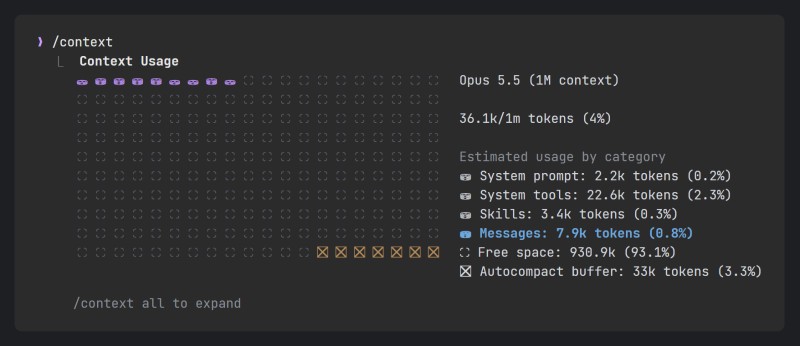
“Here’s your history file in plain sight,” Alex says. “Every square is a piece of space. Filled ⛁ are used, empty ⛶ are free. At the top you can see how much of the total capacity is used. And on the right — where it went: the agent’s system instructions and tools, skills and Messages — your conversation. The read files sit right there, in Messages: the agent opened a file — its text landed in the log. Everything the agent actually sees is right here. He has nothing beyond this.”
Tommy studies the squares.
“So these percentages are how much of the log is already used?”
“Exactly. The file is not bottomless; it has a ceiling — those squares are the whole capacity. While only a small part is used, there is plenty of room. But the longer the conversation and the more files you feed it, the denser it gets.”
“And which files exactly he has read — you can see right in the conversation,” Alex continues. “Every time the agent opens a file, a Read … line stays in the log. Look there for the file about reward accrual, reward-flow. Is it there?”
Tommy scans the conversation: pages/campaign/index.html, assets/js/shell.js, src/leaderboard.js — and that’s it.
“It’s not there.”
“Exactly. It’s not in the log. So if you now ask, ‘fix point accrual’ — the agent will be guessing blind; it can’t see this piece. On a small toy project, that almost never came up: there the whole project was two files, and it grabbed them right away. But this project is huge, it does not fit into the file as a whole, and you can see it plain as day: half of the portal is simply not in front of the agent.”
4. Put the file into the log: the @ sign
“So he’ll stay blind like that?” Tommy already understands the answer is no, but he asks anyway.
“No, of course not. If the file is not in the log, put it there yourself. Like this:”
Look at @src/reward-flow.js and tell me in one sentence what is wrong with the point accrual. Don't change anything.“The @ sign before a file name appends that file directly to the log,” Alex explains. “Wasn’t visible — now visible. Now the agent will take it into account because the file is sitting in its history. And all the ‘magic’ evaporates: you stop waiting for the agent to guess — you yourself put into its file what is needed for the task.”
Tommy tries it himself — he passes that very file that just wasn’t found through @, and first asks not to fix anything but to show what’s wrong there. And the agent points straight at the right line — because that piece is now in the log. A Read src/reward-flow.js line immediately appears in the conversation, and just to be safe, Tommy types /context again — and sees that Messages has grown: the file landed in the log, right where it should.
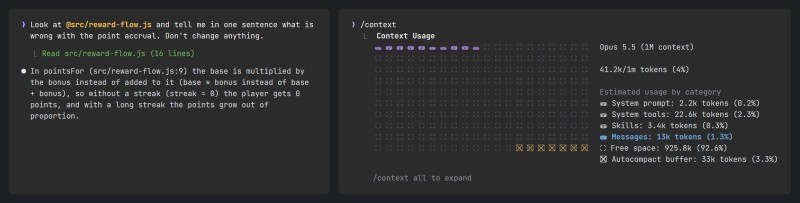
“Oh.” Tommy leans back. “So Sam wasn’t freezing at all. I just wasn’t opening his eyes — wasn’t showing him where to look.”
“There, you’ve got the main idea for today. Not ‘why didn’t he figure it out,’ but ‘well, I didn’t show him.’” Alex is pleased. “If you want the agent to take a specific file into account, don’t rely on telepathy. Feed it through @, ask it to read it, describe it. Build the log in front of it yourself.”
5. Reset the window: /clear and /rewind
“And sometimes it’s the other way around,” Alex adds. “The log gets clogged with leftovers from an old task, the agent drags extra baggage along and gets confused. Then you can start a clean file:”
/clear“That does not mean ‘delete everything,’” he clarifies, catching the worry on Tommy’s face. “The old history will be preserved, and you can always come back to it. But now the agent has a clean sheet in front of it, an empty log. You start the conversation again from scratch.”
And then an old memory pops up in Tommy’s head.
“Listen, and remember when I kept yanking /rewind during the rollback lesson? I never quite understood what exactly was being rewound.”
“And now you will.” Alex almost smiles. “It was exactly this log that was being rewound. /rewind cuts the tail off the history file — as if you rolled the tape back to the point where everything was still fine. See, another piece of the puzzle just clicked into place.”
“You know, that thing annoyed me for a month,” Tommy says. “And it wasn’t a bug. It was just this boundary: it sees the log, you didn’t hand it the file — so it doesn’t exist.”
6. Your own map of the project zones
“And since the agent sees only the log of your messages,” Alex continues, “the smartest thing you can do with this huge unfamiliar portal is draw yourself a rough map. In your own words: what is where here. Not documentation, not a pretty README — a personal cheat sheet. Let’s call it PROJECT_NOTE for ourselves. Feed it to the agent through @ — and suddenly the log is not just bare files anymore, but a map of the terrain.”
“That’s a very interesting idea. What should I write in it?” Tommy latches onto the vague part.
“Not beauty, zones. Where the showcase is, where reward accrual is, where the leaderboard is, where the bonus game is, where the partner chunks are.”
“And why does the agent need it?” Tommy throws in. “I already feed it files when I need to.”
“It’s not for the agent at all.” Alex snorts. “It’s for you. In an hour you’ll forget what is load-bearing here and what is fragile, and where it is dangerous to poke around.”
And sure enough — without a map, he’ll go in blind first. He walks through the portal file tree and sketches the map himself — rough, personal, and a bit alarming in places. He writes it not for beauty: every zone gets where it lives, what it is for, and whether it can be touched.
# PROJECT_NOTE — launch portal (my zone map)

SHOWCASE — pages/ + assets/js/shell.js, assets/css/portal.css
    section pages, shared shell: header, navigation, page wrapper.
    LOAD-BEARING: break it — the whole portal falls. Handle with care.

REWARD-FLOW — src/reward-flow.js (+ data/rewards.json)
    awarding rewards and points. The core of the campaign.
    LOAD-BEARING: the whole prize mechanism hangs on it.

LEADERBOARD — src/leaderboard.js
    leaderboard table. Reads points from reward-flow.

BONUS-GAME — src/bonus-game/
    bonus mini-game "three in a row" with its own score and tests. Lives separately from the rest.

PARTNER AREAS — src/partner/ (acme.js, globex.js)
    partner chunks. Foreign code, I haven't figured it out.
    DANGEROUS: don't touch blindly — it has its own rules, easy to break someone else's code.

Build: npm run build. Tests: npm test.
Tommy rereads his map — and it dawns on him that he is holding not just a note.
“Listen, this is basically a ready-made plan for how to enter someone else’s project. Look: I narrowed what the agent sees — not the whole portal at once, but one zone at a time. I have a map of where everything is. I know what’s load-bearing and what can be broken without fear. So I’ll start with a small safe piece — the leaderboard, for example — and I’ll bring the agent to the load-bearing and partner parts only when I understand myself what’s what.”
“Now you’re thinking like a pro.” Alex nods.

GO TO FULL VERSION