1. Introduction
When you first mastered while and for, it can feel like: “Okay, that’s it—I can repeat anything as many times as I want (and sometimes even accidentally forever).” But in real programs, there are almost always moments when repetition needs to be stopped early, or наоборот — skipped for a specific step, because it’s “bad” or “doesn’t fit”. And that’s where break and continue come in: they help make code shorter and more honest in meaning, but if you’re careless, they can turn a loop into a mini maze.
Kotlin supports the traditional break and continue statements for loops. That is, it’s not a “hack”, not magic, but a normal part of the language that you should understand just as confidently as if/else.
Imagine a loop as a line at a coffee shop: iterations are people. Sometimes someone says “I changed my mind”— and the line ends (that’s break). And sometimes a person just steps aside “to get their wallet” and skips being served in this step, but the line continues (that’s continue). The important thing to remember: these commands act inside the nearest loop, and they don’t teleport execution “somewhere”, but to strictly defined places.
A small diagram of what happens in a loop when we have both continue and break:
flowchart TD
    A[Begin iteration] --> B{Is the loop condition true?}
    B -- no --> Z[Exit the loop]
    B -- yes --> C[Loop body]
    C --> D{Should we skip?}
    D -- yes --> E[continue]
    E --> A
    D -- no --> F{Should we exit?}
    F -- yes --> G[break]
    G --> Z
    F -- no --> A
2. break: how to end a loop early
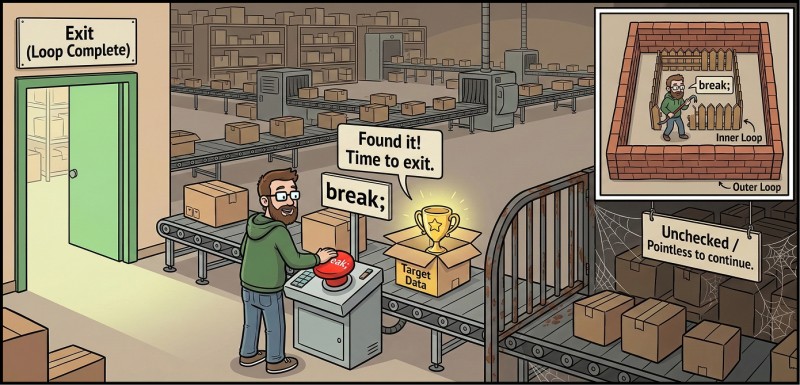
break is the command “exit the loop right now”. It’s useful when further iterations don’t make sense: you already found what you were looking for, received an “exit” command, met a “stop value”, or discovered a state where you can’t continue. The key is to understand that break stops the current loop and transfers control to the line after it. This is not “exit the program”, but exiting one specific loop.
In Kotlin, break works in while, in do-while, and in for. It always has the same effect: instantly finishes the nearest loop. From a readability point of view, break is usually good if the exit point is logically clear: “input finished”, “found”, “no point continuing”. If break is scattered through the code like confetti, the reader’s brain starts to get sad.
break in an “input until stop signal” scenario
In console programs, it’s very common to do input “until a signal”: the user enters numbers, and the number 0 means “finish”. It’s like the “Stop” button on a microwave: it doesn’t matter how long you planned to heat, if you already took the plate out.

fun main() {
    var sum = 0

    while (true) {
        print("Enter a number (0 — end): ")
        val n = readln().trim().toIntOrNull()

        if (n == null) {
            println("That’s not a number, try again.")
            continue
        }
        if (n == 0) break

        sum += n
    }

    println("Sum = $sum") // for example: Sum = 17
}
Here we use the while (true) + break style as a perfectly normal technique: the termination condition (input 0) is more convenient to check inside, because it depends on what the user entered. This reads honestly: “we spin forever until someone tells us to stop”. But an infinite loop is acceptable only when the break point is obvious and not hidden behind five levels of conditions.
break in for: “found it—exit”
Sometimes a for loop goes over a range, and we need to stop at the first suitable value. For example: let’s find the first number from 1 to 50 that is divisible by 7 and by 5 (i.e., by 35). You could, of course, write down a formula, but we’re practicing loops, not fortune-telling.
fun main() {
    var found = -1

    for (x in 1..50) {
        if (x % 7 == 0 && x % 5 == 0) {
            found = x
            break
        }
    }

    println("Found: $found") // Found: 35
}
Notice the trick with found = -1. This is a “default value” that means “not found”. We don’t know null-safety as a separate topic yet (that will be later), so for beginners this approach is often simpler: choose a value that cannot appear in a normal result.
Why break shouldn’t be hidden
A very common problem is writing break in a way that makes it hard to notice. Technically, the code will work, but reading it will feel unpleasant—like a 40-page contract in tiny print.
A bad habit looks roughly like this: inside the loop there are lots of branches, and break sits somewhere deep down. To avoid this, try placing exit checks “closer to the start of the iteration”, especially if they’re related to input data. It’s easier on the brain: first check “are we continuing?”, then do the useful work.
3. continue: how to skip the current iteration
continue is the command “finish the current iteration right now and move to the next one”. That is, the loop does not end, but the remaining part of the body does not run. If you imagine an iteration as a mini script, then continue is “skip this episode, go to the next one”.
Kotlin, like many languages, supports continue in loops. In practice, continue is especially useful when you want to build a “filter”: some values are processed, others are skipped. This often makes code shorter because it removes unnecessary nested if.
continue as a filter in for

Suppose we want to print only the odd numbers from 1 to 10. You can write the condition “if it’s odd—print it”, or you can flip the logic: “if it’s even—skip it”.
fun main() {
    for (i in 1..10) {
        if (i % 2 == 0) continue
        println(i) // 1 3 5 7 9 (each on a new line)
    }
}
Why is this form sometimes more convenient? Because after continue you can write the “main” logic without an extra else. It’s like a bouncer at the entrance: “you don’t fit—walk past”, and inside the club there’s a normal party (i.e., the main code).
continue in while: be careful, you can create an infinite loop
In for, the step happens automatically, but while relies on your discipline: you must change state so that the loop eventually ends. And this is exactly where continue can “shoot you in the foot”, because it can easily jump over important lines, including updating the counter.
Look at the example: we want to print the numbers 1..5, but skip 3. If you write it naively, you can accidentally get an infinite loop that gets stuck on 3.
Incorrect version (shown as an anti-example—don’t do this):
fun main() {
    var i = 1
    while (i <= 5) {
        if (i == 3) continue
        println("i = $i")
        i = i + 1
    }
}
What happened here? When i == 3, continue triggers, and the line i = i + 1 is skipped. So i stays 3 forever, and the loop never ends. This is that moment when the computer becomes too literal of a friend: you said “continue”, and it continues… forever.
The correct version is to update i before continue (or restructure the code so the update always happens):
fun main() {
    var i = 1
    while (i <= 5) {
        if (i == 3) {
            i = i + 1
            continue
        }
        println("i = $i")
        i = i + 1
    }
}
Yes, this looks a bit longer, but the logic is correct: the state that the while condition depends on always changes.
4. break and continue: together, without hurting the reader
Mini scenario: “number piggy bank”
Now let’s put together a small complete scenario that looks like a real console program, not a set of separate fragments. We’ll make a “piggy bank”: the user enters numbers (for example, “how many coins they added”), and the program accumulates a sum. Input ends with the command number 0. We’ll ignore invalid lines and negative values, but we won’t terminate the program—just ask to enter again.
This is exactly where it’s natural to have continue for “bad input” and break for “the end”.
fun main() {
    var total = 0

    while (true) {
        print("Enter an amount (integer >= 0, 0 — finish): ")
        val raw = readln().trim()
        val value = raw.toIntOrNull()

        if (value == null) {
            println("Doesn’t look like an integer.")
            continue
        }
        if (value < 0) {
            println("We don’t accept negative values. We’re saving up, not getting sad.")
            continue
        }
        if (value == 0) break

        total += value
        println("Current total in the piggy bank: $total") // for example: Current total in the piggy bank: 15
    }

    println("Done. Total: $total") // for example: Done. Total: 15
}
Notice an important detail: the order of checks here is not accidental. First we figure out whether it’s even a number (toIntOrNull()), then we check the range (is it negative), then we check the “stop value” (0), and only after that do we do useful work (add to total). This order makes the code more predictable, and therefore easier to debug.
How to keep code readable with break and continue
At this stage of learning, there is one very typical temptation: “Oh, now I can jump around inside a loop! Let’s add a couple more continue, one more break, and one more if, and we’ll get… uh… what will we get”. With break/continue it’s important to remember a simple readability rule: if you can’t quickly explain out loud why the loop can end, and in which cases an iteration is skipped, then it’s time to simplify the code.
Since we’re not using user-defined functions yet (that will be later), simplification is usually done in three ways. First, by extracting intermediate values into clear variables (raw, value, isValid). Second, by placing “guard checks” at the beginning of the iteration: everything that leads to continue or break, we try to put higher up. Third, by treating while (true) carefully: it’s good when the meaning “loop until an exit command” reads clearly, but bad when break is hidden far away and isn’t obvious.
There’s one more nuance that will be useful in the next lecture about nested loops: break and continue without additional tools apply to the nearest loop. We won’t go deep into this today, but it’s important to at least remember that “exit two loops with one break” does not happen by default— and that’s normal.
5. Typical mistakes when working with break and continue
Mistake #1: mixing up the roles of break and continue.
Beginners sometimes expect continue to “exit the loop”, but it only skips the current iteration and moves to the next one. As a result, the program keeps “spinning”, even though the person wanted to stop. If you need to end the loop completely—use break. If you only need to not run the remaining code in the iteration—use continue.
Mistake #2: continue in while jumps over state updates.
This is the classic cause of infinite loops: a counter or other state is updated at the end of the body, but on some branches there is continue, which skips that update. The loop “gets stuck” at the same value and cannot reach its termination condition. The cure is discipline: the variable participating in the while condition must be guaranteed to change so that the condition eventually becomes false—even on branches with continue.
Mistake #3: while (true) without a clearly readable break.
An infinite loop by itself isn’t evil, but it must be honest: the exit point should be quickly visible, usually in the upper part of the body. If break is hidden deep in branching, a person (and you two days later) stops understanding how the loop ends at all. In such situations it’s better either to rewrite the condition into the while (...) header, or to restructure checks so that break is obvious.
Mistake #4: too many “jumps” in one loop.
When a loop has three continue and two break, the code starts to resemble the game “guess where you’ll end up in a second”. Formally it can be correct, but it’s hard to read and maintain. Reordering checks to the beginning of the iteration and simplifying conditions usually helps: less nesting, more direct meaning.
Mistake #5: using toInt() instead of toIntOrNull() in an input loop.
If you do input in a loop, the user is almost guaranteed to enter something wrong at some point: a space, an empty line, “five”, “12.3”, “-”. toInt() in such a place leads to a crash (abrupt program termination), meaning your loop won’t even have a chance to “politely ask again”. For robust input, use toIntOrNull(), and handle invalid input via continue so the loop simply asks for input again.

GO TO FULL VERSION