1. Getting to know the compiler
A computer does not understand human language. A computer does not even understand programming languages. It understands only programs written in machine code — made up of zeros and ones. People think in words and ideas, and of course, it is hard for them to compose entire programs using nothing but 0 and 1.

00100100 is interpreted as the decimal number
36 or the character
$
That is why programming languages like Go appeared. They became a kind of “translator”: now a programmer can write commands like “Do this and that” in a language they understand, rather than as a long chain of commands to the CPU.
But there is a catch. The computer still does not understand Go! If you just feed it a file with code, it will shrug and do nothing. That is exactly why the compiler exists.
So what is a compiler?
A compiler is a special program that compiles code: it translates Go code into code the computer can understand. It takes text in Go, parses it, checks it for errors, and turns it into machine code.
- Program in the Go language
-
Compiler
- A program consisting of machine code
You can think of the compiler as a strict teacher who:
- carefully checks your phrases (did you make a mistake?),
- forces you to follow the rules (for example, correct variable names, brackets...),
- and only after that lets you “talk” to the computer!
Without a compiler, writing a program would be like composing “War and Peace” in Morse code.
The compiler is even smarter
The Go compiler has become even smarter — it can not only translate, but also optimize code, point out errors, and even suggest how to write better. And a lot more.
In Go, you usually run compilation not “manually”, but via an IDE (or the go command in the terminal). Under the hood, that is also several steps:
- First, the Go compiler compiles your code (usually by packages), checks types, performs optimizations, and generates object code.
- Then the linker “puts” everything together and produces the final executable file (a binary) for the chosen OS and architecture.

    flowchart TD
A([Source code .go]):::source

A --> B

subgraph COMPILER[" Go compiler"]
    B[Parsing code by packages]:::step
    B --> C[Type checking]:::step
    C --> D[Code optimization]:::step
    D --> E[Object code generation]:::step
end

E --> F

subgraph LINKER["Linker"]
    F[Linking all packages together]:::step
end

F --> G & H & I

G([Windows.exe]):::platform
H([Linux binary]):::platform
I([macOS binary]):::platform

classDef source fill:#E1F5EE,stroke:#0F6E56,color:#04342C,font-weight:500
classDef step fill:#EEEDFE,stroke:#534AB7,color:#26215C,font-weight:500
classDef platform fill:#FAECE7,stroke:#993C1D,color:#4A1B0C,font-weight:500
That is why the same program in Go can be built for different platforms (for example, Windows/Linux/macOS) — simply as different builds for different targets.
2. Compilation errors
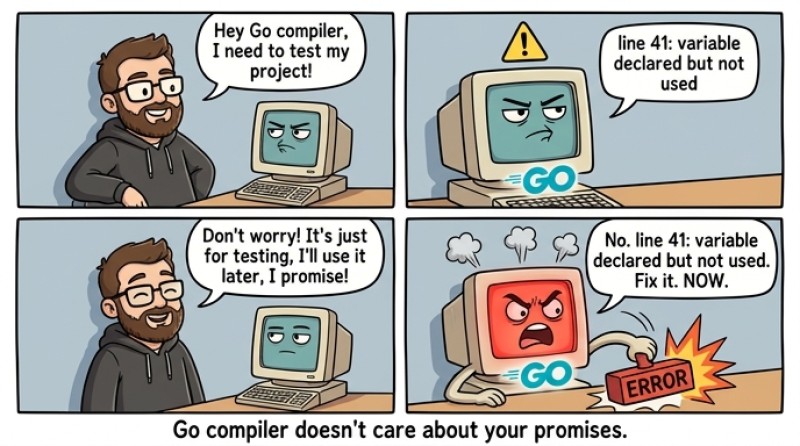
In Go, the compiler is also very strict: if there is an error in the code, the program simply won’t build. That is good: you catch the problem immediately, before running it.
Example 1: mixed up types
In Go, you can’t assign a number to a variable of type string:
package main

func main() {
	var userName string = 42 // error: cannot use 42 (untyped int) as string
	_ = userName
}
The compiler will directly tell you that you are trying to use an int where a string is required.
Example 2: a typo in the name
If you made a mistake in the function name, Go will say that such a name does not exist:
package main

import "fmt"

func main() {
	fmt.Prinln("Hello!") // error: fmt.Prinln undefined
}
How do you read Go compiler errors?
The message usually contains: file, line and column, and the error text. Example format (roughly): main.go:7:6: undefined: something
Look first at the line/column, then read the message: the compiler usually explains quite honestly what exactly it doesn’t like.
3. Typical compilation errors in Go
undefined: X — name not found
Either a typo, or you forgot an import, or you are using a variable outside its scope.
package main

import "fmt"

func main() {
	fmt.Println(hello) // error: undefined: hello
}
You need to either declare hello, or print the string "hello".
cannot use ... as ... — types don’t match
The most common case is that you try to mix different types without an explicit conversion.
package main

import "fmt"

func main() {
	var a int = 10
	var b int64 = 20

	fmt.Println(a + b) // error: mismatched types int and int64
}
In Go, you must explicitly convert: int64(a) + b (or vice versa).
declared and not used — declared but not used
Go does not like “extra” variables.
package main

func main() {
	x := 10 // error: declared and not used: x
}
If it is temporary, you can explicitly “use” it via _:
_ = x
imported and not used — imported but not used
package main

import "fmt" // error if fmt is not used anywhere

func main() {}
Remove the import or start using the package.
syntax error: unexpected ... — broken syntax
This is the equivalent of “expected …” in other languages: the compiler encountered something different from what it expected. A common reason for beginners is missing parentheses/comma/brace:
package main

import "fmt"

func main() {
	fmt.Println("Hi"  // error: unexpected newline, expected ')'
}
The fix is to close ).
4. Comments

So, imagine: you are writing a complex program. Everything works, you’re a genius! But a month later you open that same code and... understand nothing. A couple lines of code here, a weird variable there. In your head there is only: “Someone definitely wrote this — but not me!”. This is where comments save you.
Comments are like notes in the margins of a textbook or labels on the fridge (“Beer. Do not drink. For the morning!”). The compiler ignores them, but people do the opposite. Comments let you explain the meaning of the code, mark important details, and even “turn off” chunks of programs without deleting them.
Important: No compiler reads your comments; they are completely ignored!
Single-line comments
In Go, there are two kinds of comments — single-line and multi-line. Single-line comments start with a double slash // and go until the end of the line. Everything after // is considered a comment and is completely ignored by the compiler.
Example:
fmt.Println("Hello, world!") // This prints a greeting to the screen
Here, // This prints a greeting to the screen is a comment. If it seems unclear in the code why a line is needed, write it like this!
Another example:
var x int = 42 // The programmer's age value
You can also write single-line comments on separate lines:
// Initialize a variable with the user name
var userName string = "Vasya"
Almost like lines in a script: the comment explains what and why.
Multi-line comments
What if you have a lot accumulated? A whole story? That is what multi-line comments are for: they start with /* and end with */. Everything between these symbols is ignored by the compiler, even if it spans several lines.
Example:
/*
  Here we print the user name to the screen.
  If the name is missing, we will print "Guest".
*/
fmt.Println("Enter your name:")
Or like this:
var age int = 18 /* Initial age value
                    for a new user */
Attention: you cannot nest multi-line comments inside other multi-line comments. Don’t try to be trickier than the compiler — it won’t work.
Illustration:
| Type | Syntax | Example |
|---|---|---|
| Single-line | |
|
| Multi-line | |
|
5. Real-life examples
“Disabling” a line of code:
Sometimes you temporarily want not to execute some fragment of code. Comments are perfect for this:
// fmt.Println("Text that is temporarily not needed")
The line remains, but the compiler does not “see” it.
TODO and FIXME notes
Programmers are people too, and sometimes you need to remind yourself that the code is not finished yet, or that there is a bug here. For this, people often write:
// TODO: add validation for empty input
// FIXME: this function calculates the sum incorrectly
Many editors and IDEs even highlight such words!
Programmers joke
And of course, sometimes you run into very interesting comments in code:
// I am not responsible for this code. I was forced to write it against my will.
// Dear, i_from_the_future! Please forgive me for this code.
// If I ever see something like this again, I will have to start bringing a weapon to work.
// If this condition ever becomes true, please contact me at tel. xxx-xxx-xxx for a reward.
// Dear programmer:
//
// When you finish “optimizing” this subroutine
// and realize what a huge mistake it was,
// please increment the counter below as a warning
// for the next guy:
//
// hours_wasted_here = 42
// When I started writing this, only God and I understood what I was doing.
// Now only God does
// sometimes it seems to me that the compiler ignores all my comments
// I dedicate all my code, all my work to my wife Darlene, who
// will have to support me, our three kids, and the dog when
// this goes to production.
Yes, comments can be very funny. After all, they are written by real people.

GO TO FULL VERSION