1. Declaring variables
Let’s once again recall how to create variables. To create a variable in Go, most often you write: var name type.
Examples:
| Command | Explanation |
|---|---|
|
A variable s of type string is created. Such a variable can store text. |
|
A variable x of type int is created. Such a variable can store integers. |
|
Variables a, b, c, d of type int are created. Such variables can store integers. |
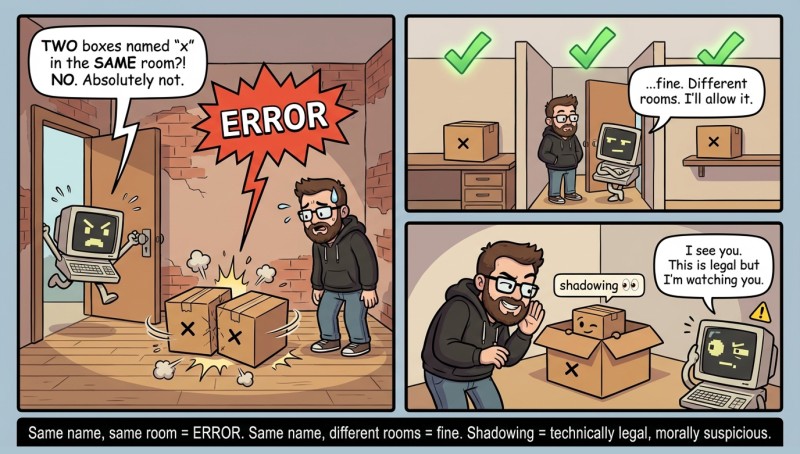
You cannot create two variables with the same names in the same code block. But in different ones you can: in Go (as in other languages) there are blocks { ... }, and in an inner block you can declare a variable with the same name (this is called shadowing), although beginners should avoid doing this unless necessary. More about code blocks is covered in the next lectures.
There are also restrictions on the variable name. On the one hand, it can be anything; on the other hand, it cannot contain spaces or characters like +, -, etc. It’s best to use only Latin letters and digits in a variable name.
And I’ll remind you again that in Go it matters which letters you write — uppercase or lowercase. var a int is not the same as var A int.

By the way, in Go you can create a variable and assign it a value at the same time. This saves time and space. For this, people often use the short declaration :=:
| Compact code | Long code equivalent to the code on the left |
|---|---|
|
|
|
|
|
|
|
|
|
|
This is much more compact and easier to understand.
Now that we’ve already figured out how to create variables, let’s get acquainted with the two most commonly used types in Go. These are int (integers) and string (text/strings).
2. The int type
A variable of type int can store integers: 5, -10, 100500. You can also perform various arithmetic operations on the int type: addition, subtraction, multiplication, division, and others. Examples:
package main

import "fmt"

func main() {
	{
		x := 1               // x will be equal to 1
		y := x * 2           // y will be equal to 2
		z := 5*y*y + 2*y + 3 // z will be equal to 20+4+3, will be equal to 27

		fmt.Println(x, y, z)
	}

	{
		a := 5                 // a will be equal to 5
		b := 1                 // b will be equal to 1
		c := (a - b) * (a + b) // c will be equal to 4*6, will be equal to 24

		fmt.Println(a, b, c)
	}

	{
		a := 64    // a will be equal to 64
		b := a / 8 // b will be equal to 8
		c := b / 4 // c will be equal to 2
		d := c * 3 // d will be equal to 6

		fmt.Println(a, b, c, d)
	}
}
If you didn’t skip math classes at school, everything here should be clear.
3. The float64 type
The int type stores only integers. But what if we need numbers with a fractional part? For that, there is the float64 type.
It stores floating-point numbers:
x := 3.14;
y := -0.5;
z := 2.0;
A special feature of float64
Numbers of type float64 are stored in memory approximately. Sometimes unexpected effects may appear:
var x float64 = 0.1 + 0.2; // 0.300000004You might expect exactly 0.3, but an approximate value is stored internally. This is normal. That’s how fractional numbers are represented in a computer.
4. The string type
The string type lets you store text strings. And to specify some text string in Go, you need to write the text, and put double quotes on both sides. Example:
| Code | Explanation |
|---|---|
|
s will contain the text Amigo |
|
s will contain the text 123 |
|
s will contain the text Bond 007 |
Doesn’t look hard, right? If so, here’s one more interesting fact.
Strings in Go can be concatenated using the plus sign — +. Example:
package main

import (
	"fmt"
	"strconv"
)

func main() {
	s := "Amigo" + " the best" // s will contain Amigo the best
	fmt.Println(s)

	s = "" // s will contain an empty string — with no characters at all.
	fmt.Println(s)

	x := 333
	s = "Amigo" + strconv.Itoa(x) // s will contain Amigo333
	fmt.Println(s)
}
Pay attention to the last example: we added a string and a number. In Go, a number is not converted to a string automatically, so you need to do the conversion explicitly (for example, using strconv.Itoa).
5. Printing a variable to the screen
Everything seems so obvious and simple. Then maybe you can immediately guess which command can print a variable to the screen?
In fact, it’s simple. To print something to the screen, we use functions from the fmt package, for example fmt.Println(), where we pass what we want to output as parameter(s).
package main

import "fmt"

func main() {
	fmt.Println("Amigo") // Amigo

	fmt.Println("Ami" + "go") // Amigo

	s := "Amigo"
	fmt.Println(s) // Amigo

	s = "Am"
	fmt.Println(s + "igo") // Amigo
}
Hopefully, it has become a bit clearer now. And whether you understood everything correctly or not, we will check right now. Practice is the criterion of truth: only with practice can you check how well you’ve figured everything out.
6. Shorthand assignment operators (+=, -=, *=, /=)
Go has a convenient way to write operations of the form:
x = x + 5It can be written shorter:
x += 5This is called shorthand assignment.
Examples:
x := 10

x += 5  // x = 15
x -= 3  // x = 12
x *= 2  // x = 24
x /= 4  // x = 6
That is:
x += a   →   x = x + a
x -= a   →   x = x - a
x *= a   →   x = x * a
x /= a   →   x = x / a
This is not just “code beauty” — these forms are shorter, clearer, and are used all the time.
Shorthand operators also work with strings:
s := "Hello"
s += " World" // "Hello World"
On JavaRush, you are studying the newest version of Go 1.25, so you immediately have access to all the cool stuff. Enjoy! 😎

GO TO FULL VERSION