1. Introduction
Almost any real-world program constantly makes choices. If the user entered invalid data, show a hint. If age is less than 18, do not sell a ticket. If the purchase amount is more than 3000, give a discount. Without branching, a program turns into a tape recorder: it honestly plays through one scenario while the world around it changes.
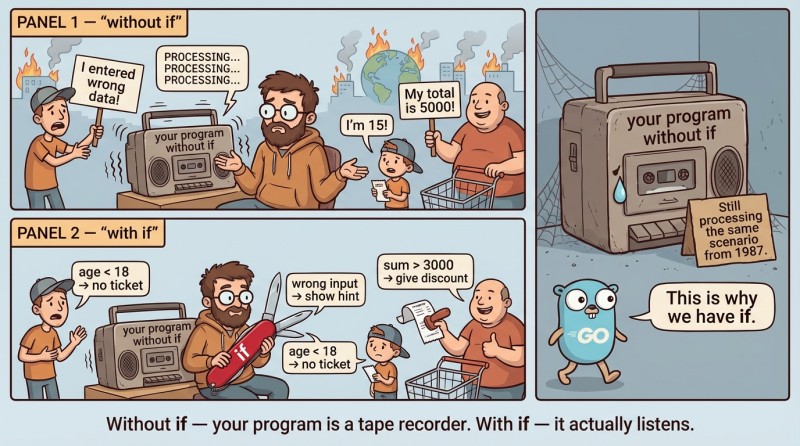
In Go, there are several tools to control flow, and the most basic one is if. Without it, you cannot write flexible code that reacts to input.
Basic if: a bool condition and mandatory {}
The simplest if is “if the condition is true, execute the block.” It reads almost like human speech. But Go has a principle: “better strict and predictable than magic.” That’s why the condition in if must be bool, and curly braces are part of the syntax, not decoration.
Basic form:
if condition {
    // code that runs if condition == true
}if syntax in Go
Example (our mini-project “Cinema ticket booth”: determine whether the visitor is an adult):
package main

import "fmt"

func main() {
	age := 20

	if age >= 18 {
		fmt.Println("Adult ticket") // Adult ticket
	}
}
Here age >= 18 is an expression whose result has type bool. These kinds of expressions (comparisons) are exactly what we use in conditions.
Why you can’t write if age { ... }
In many languages, a “non-zero number” is considered true. In Go, you can’t do that: int is int, and bool is bool. Therefore, the construct below will not compile:
// not allowed in Go
age := 20
if age {
    ...
}
If you want to check “not zero,” write it explicitly:
if age != 0 {
    ...
}
This may feel pedantic, but in practice it saves you from a ton of weird bugs: the program won’t “guess” what you meant.
2. if/else and else if: two branches and a chain of checks
if/else: exactly one branch runs
Very often, “if it’s true, do it” is not enough. You need an “otherwise” option. In Go, this is done with else: if the condition is false (false), the alternative block runs. It helps to think of it this way: if chooses one of two doors, and you will definitely go through exactly one.
Form:
if condition {
    // true branch
} else {
    // false branch
}
if/else syntax in Go
Let’s continue with the “cinema ticket booth”:
package main

import "fmt"

func main() {
	age := 16

	if age >= 18 {
		fmt.Println("Adult ticket")
	} else {
		fmt.Println("Child ticket") // Child ticket
	}
}

Notice an important syntax detail: else must be on the same line as the closing } from the if branch, i.e., like this: } else {. If you move else to a new line, you can get a compilation error due to rules about inserting “implicit” semicolons.
else if: a chain of checks from top to bottom
When there are more than two options, the classic scenario starts: “if age is less than 7, it’s free; if less than 18, it’s a child ticket; otherwise, adult.” In Go, you use else if for this. It looks like a staircase: the checks go from top to bottom, and the first matching branch runs.
Form:
if cond1 {
    ...
} else if cond2 {
    ...
} else {
    ...
}
Example (a more realistic ticket booth):
package main

import "fmt"

func main() {
	age := 12

	if age < 7 {
		fmt.Println("Free entry") // Free entry
	} else if age < 18 {
		fmt.Println("Child ticket") // Child ticket
	} else {
		fmt.Println("Adult ticket")
	}
}
Why the order of conditions matters
Checks go from top to bottom. If you accidentally put a “broad” condition before a “narrow” one, the narrow one can become unreachable.
For example, this is bad:
package main

import "fmt"

func main() {
	age := 6

	if age < 18 {
		fmt.Println("Child ticket") // Child ticket (but we wanted "Free entry")
	} else if age < 7 {
		fmt.Println("Free entry")
	} else {
		fmt.Println("Adult ticket")
	}
}
The age < 7 branch will never run, because all values < 7 have already matched < 18. This is one of the most common logical mistakes beginners make: the program is correct for the compiler, but not for reality.
3. Blocks {} and scope
When you see { ... }, don’t think “braces for beauty,” think “the border of a small world.” Inside a block, you can declare variables, and they will live only there. This is called scope. It’s needed so code doesn’t turn into a junkyard of variables that you declared “just in case” and forgot about.
Imagine a kitchen: if you take out a knife, chop a salad, and put it away immediately, the kitchen stays clean. If you leave all knives, pots, and ladles “on the table forever,” cooking becomes scary. Variables are the same kinds of items on the table.
Example: a variable lives only inside if
package main

import "fmt"

func main() {
	if x := 10; x%2 == 0 {
		fmt.Println("x is even:", x) // x is even: 10
	} else {
		fmt.Println("x is odd:", x)
	}

	// fmt.Println(x) // not allowed: x is not visible outside the if
}
Here x := 10 is declared in the “if initializer” (we’ll discuss it in more detail a bit later), and x is available inside both branches of if/else, but not outside.
A small table for orientation
| Where you declared the variable | Where you can use it |
|---|---|
| In main (outside blocks) | Everywhere in main after the declaration |
| Inside a { ... } block | Only inside that block |
| In if x := ...; cond { ... } | Inside if and else (and only there) |
This mechanism will later become your best friend: you’ll “pin down” temporary variables into the smallest necessary scope, and your code will become easier to read.
4. if with an initializer: prepare the data and check it
Sometimes you can’t check a condition “out of thin air”—you first need to compute a value. For this, Go lets you write if in the form “initialization; condition.” This is super practical because the temporary variable doesn’t “leak” outward and doesn’t clutter main.
Form:
if init; cond {
    ...
} else {
    ...
}
Example: read age as a string and try to parse it
We already know strconv.Atoi, and we know that there can be an error. Without diving into error philosophy yet, we’ll use it as a simple fact: sometimes parsing fails.
package main

import (
	"fmt"
	"strconv"
)

func main() {
	ageStr := "21"

	if age, err := strconv.Atoi(ageStr); err == nil {
		fmt.Println("Age:", age) // Age: 21
	} else {
		fmt.Println("Invalid age") // (will not run for "21")
	}
}
Notice: variables age and err exist only inside if/else. Outside, they don’t exist—and that’s good, because our main doesn’t keep any “tails” from intermediate steps.
By the way, in Go a check like if err != nil { ... } is such a popular pattern that it’s usually among the first things people memorize: “did an operation → checked the error → moved on.”
5. Nested if: fine until it becomes a pyramid
A nested if is when inside an if branch there is another if. It’s legal, it works, and sometimes it’s genuinely convenient. But nesting has an unpleasant side effect: indentation grows, your brain starts “holding context,” and at some point you read code like an ancient prophecy: “if this was true, and if that was true, and if the stars aligned...”
Today our goal is to learn how to write nested if neatly and consciously, without turning the program into a maze.
Example: “cinema ticket booth” and a student discount
Suppose the rules are: if the visitor is a minor, it’s a child ticket. If they’re an adult, it’s an adult ticket, but if they’re a student, then it’s “adult with discount.”
Let’s do it without logical operators (we’ll cover them separately), just using nesting:
package main

import "fmt"

func main() {
	age := 20
	isStudent := true

	if age >= 18 {
		if isStudent {
			fmt.Println("Adult ticket with discount") // Adult ticket with discount
		} else {
			fmt.Println("Adult ticket")
		}
	} else {
		fmt.Println("Child ticket")
	}
}
This code is quite readable: only one level of nesting, and the logic is clear.
Diagram: how the program thinks
Sometimes it helps to imagine if/else as a fork in the road:
flowchart TD
    A[Start] --> B{age >= 18?}
    B -- yes --> C{isStudent?}
    C -- yes --> D[Adult with discount]
    C -- no --> E[Adult without discount]
    B -- no --> F[Child ticket]
If while reading code you catch yourself thinking “I already forgot which branch we’re in,” that’s a signal: either reduce nesting, or rename conditions/variables, or (a bit later in the course) extract logic into functions. But for now we’re working only within main, so the focus is on a neat structure.
6. Mini-build: a ticket booth with user input and else if
Now we’ll assemble a complete example that uses what you already know: fmt.Scan, if/else if/else, blocks, and clear variable names. This is not “homework,” just a demonstration of how parts of the language come together into one small program.
The rules are:
- read age from stdin as a number,
- if age is less than 0, it’s an input error,
- if less than 7, it’s free,
- if less than 18, it’s a child ticket,
- otherwise, adult.
package main

import "fmt"

func main() {
	var age int
	fmt.Scan(&age)

	if age < 0 {
		fmt.Println("Error: age cannot be negative")
	} else if age < 7 {
		fmt.Println("Free entry")
	} else if age < 18 {
		fmt.Println("Child ticket")
	} else {
		fmt.Println("Adult ticket")
	}
}
There is nothing “magical” here: the program simply chooses one branch. And that’s exactly what makes it useful—it reacts differently to different inputs.
7. Common mistakes when working with if/else
Mistakes in if are usually not about “complex algorithms,” but about small syntax and logic slips. And the trickiest part: some of these errors the compiler catches immediately (and that’s good), while others turn into incorrect program behavior (and then you’re doing detective work at the “who ate the cookies at night” level). Below are the most common pitfalls almost everyone runs into.
Error #1: the condition is not bool.
Beginners often try to write if age { ... }, because “in other languages you can.” In Go, the condition must be a boolean expression. You must compare explicitly: if age != 0 or if age > 0. It may seem pedantic, but over the long run it saves time: the code reads unambiguously, without guesswork.
Error #2: forgetting that {} are mandatory.
In Go, you cannot write if cond println("hi"). Even if there is only one statement, a block is required. At first it’s annoying, then you get used to it and suddenly start appreciating it: you can always see the branch boundaries visually, and when you add a second line nothing “breaks.”
Error #3: else on a new line.
If you write it like this:
if cond {
    ...
}
else {
    ...
}
you may get a compilation error. In Go, it’s customary to write else as } else { on one line. This is related to how Go inserts “implicit” semicolons, but it’s enough to remember the practical rule: the closing brace and else like to be on the same line.
Error #4: mixing up the order of conditions in else if.
When you write “ranges,” narrower/stricter conditions should come first, and more general ones later. Otherwise the “general” one will catch all cases earlier. Classic trap: placing age < 18 above age < 7, and then wondering why “free entry” never happens.
Error #5: the variable was declared inside a block, and you try to use it outside.
This especially often happens with an if initializer: if x := ...; cond { ... }. Inside, everything works, and then your hand reaches to write fmt.Println(x) after the if. The compiler will say “I don’t know x,” and it will be right. If you need the value after branching, declare the variable before the if, and inside only assign to it.

GO TO FULL VERSION