1. bool and comparisons
When a program has to make a decision, it needs an answer along the lines of “yes/no”, “true/false”, “let in/don’t let in”. In Go, there is a dedicated type for this: bool. It looks modest, but it is exactly what turns a program from a “calculator” into a “system that reacts to a situation”.
And yes, bool has only two values — true and false. But these two values are enough to build complex access rules, checks, filters, and basically all “if…, then…” logic.
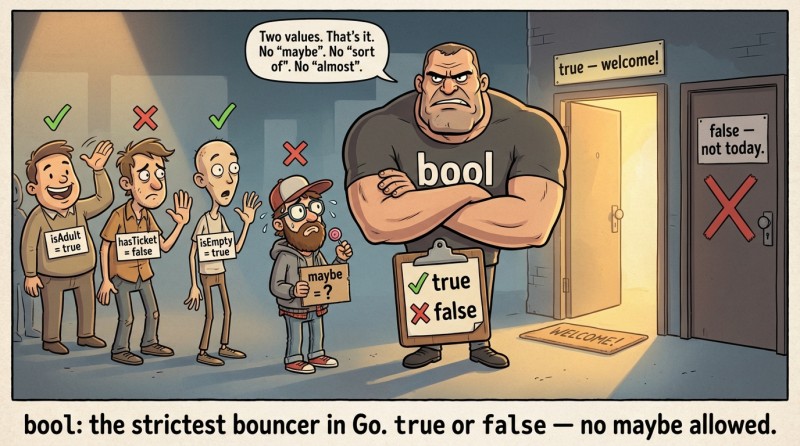
In Go, it’s customary to store boolean values in variables with descriptive names: isAdult, hasTicket, isEmpty. Then the code reads almost like prose: “isAdult equals true” — “is an adult”.
But if you name a variable x2, then five minutes later you’ll forget what it was, and start suspecting it’s the Wi‑Fi password.
package main

import "fmt"

func main() {
	isWeekend := true
	fmt.Println(isWeekend) // true
}
Comparison is an expression whose result is always bool
Before a program can say “yes” or “no”, it has to be able to compare values. A comparison is an expression that returns bool. That is, the result of a comparison will be either true or false, and nothing else (no 1 or 0 like in some languages).
A useful habit: mentally read a comparison as a question. For example, a > b is the question “Is a greater than b?”. The answer will be true or false.
Below is a simple example: we’ll compare two numbers and store the result in a variable.
package main

import "fmt"

func main() {
	a := 10
	b := 7

	greater := a > b
	fmt.Println(greater) // true
}
Note: a > b doesn’t “do something”; it is evaluated. Like a + b, except instead of a number it gives a boolean value.
Operators == and !=: equality and inequality
Let’s start with the most popular comparison operators: == and !=.
The == operator means “equal to”, and != means “not equal to”. And this is where typical beginner mistakes begin: people confuse = and ==.
In Go (and in most languages), = is assignment: “put the value into the variable”. And == is comparison: “are they the same?”.

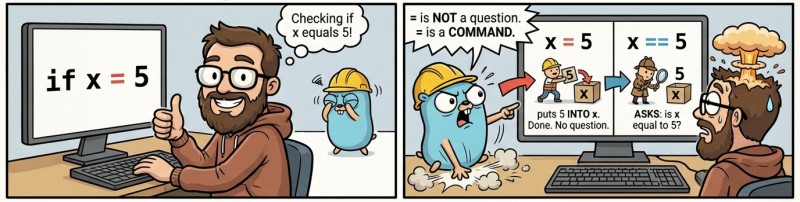
If you write x = 5, you change the variable. If you write x == 5, you get true or false.
With numbers it looks like this:
package main

import "fmt"

func main() {
	x := 5

	isFive := x == 5
	isNotFive := x != 5

	fmt.Println(isFive)    // true
	fmt.Println(isNotFive) // false
}
With strings, == and != also work — and that’s super useful for checks like a login, a user command, a promo code, a status, etc.
package main

import "fmt"

func main() {
	role := "admin"

	isAdmin := role == "admin"
	isGuest := role != "admin"

	fmt.Println(isAdmin) // true
	fmt.Println(isGuest) // false
}
An important point: comparing strings with == compares the contents of the strings (the sequence of characters), not a “memory address”. That is, "go" == "go" will be true, and that’s exactly the behavior we want.
Operators < <= > >=: numeric ordering and condition boundaries
Now for ordering operators: <, <=, >, >=. They are usually applied to numbers (for example, int), and they are the main tool for range checks: “age is at least 18”, “score is greater than or equal to 75”, “temperature is below zero”.
Let’s summarize the main comparison operators in a table so you have a “cheat sheet in your head”.
| Operator | How to read | Example | Result |
|---|---|---|---|
|
equal to | |
|
|
not equal to | |
|
|
less than | |
|
|
less than or equal to | |
|
|
greater than | |
|
|
greater than or equal to | |
|
A practical example with “boundaries”: let’s check whether a number fits into a range. For now we won’t do branching, but we’ll already see boolean results.
package main

import "fmt"

func main() {
	score := 82

	isHigh := score >= 90
	isMedium := score >= 75

	fmt.Println(isHigh)   // false
	fmt.Println(isMedium) // true
}
Note this idea: one number (score) can participate in multiple comparisons, and each comparison yields its own bool. Later these boolean values will become “building blocks” of logic — like pieces of a construction set.
You can compare only compatible types
Comparison seems simple until the urge appears to compare “anything with anything”. For example: a string with a number. Or int with float64. Or even “everything with everything” — because “well, we know what we meant”.
Go says “No” in such situations. And that is good.
The idea is very simple: comparison operators work only for compatible types. In the learning part of the course, you can remember this rule like this: compare int with int, string with string, bool with bool.
For example, this is not allowed (and that’s correct, because "18" as a string and 18 as a number are different things):
// don't write like this: this is an example of a compilation error
ageStr := "18"
fmt.Println(ageStr >= 18) // cannot compare string and int
What should you do instead? First, convert the data to a single type. We already know how to turn a string into a number using strconv.Atoi. Today we are not going deep into error handling, but the principle “types first, then comparison” is fundamental.
Another common pattern: comparing with len(s). len(s) returns a number (int), so the result can be compared with numbers.
package main

import "fmt"

func main() {
	login := "gopher"

	isEmpty := len(login) == 0
	isLong := len(login) >= 8

	fmt.Println(isEmpty) // false
	fmt.Println(isLong)  // false
}
Boolean variables with good names
When real checks begin, it’s easy to write a one-line condition that looks like the password to an ancient archive: it seems to work, but nobody wants to touch it. So boolean variables are not only about the type, but also about style.
If we store the results of comparisons in variables with “human” names, the program becomes much clearer. This is especially important for beginners: you get less confused and you notice faster where the logic went off the rails.
Below is an example: we take data (for now just by assignment), perform comparisons, and print the results.
package main

import "fmt"

func main() {
	age := 20
	hasTicket := true

	isAdult := age >= 18
	canEnter := isAdult == true // for now, without logical operators

	fmt.Println(isAdult)   // true
	fmt.Println(canEnter)  // true
	fmt.Println(hasTicket) // true
}
There is an important detail here: canEnter := isAdult == true looks a bit odd (because isAdult is already a bool). We wrote it this way on purpose to emphasize: == also works with bool. In real code, people more often write canEnter := isAdult.
2. Practice: “Entrance control at the Go programmers club”
Let’s assemble a small piece of an application that we will develop further. Imagine we have a console program for entrance control: the user enters a name and age, and we compute boolean flags and print a diagnostic line.
For now, we are not deciding “let in or not” using if — we are only preparing the data so that in the next step the program can make a decision.
The main goal of this fragment is to see how read → compute → print turns into “read → compute booleans → print”.
package main

import "fmt"

func main() {
	var name string
	var age int
	fmt.Scan(&name, &age)

	isAdult := age >= 18
	isVIP := name == "admin"

	fmt.Println(isAdult, isVIP) // example: true false
}
Several useful things happen here at once.
First, fmt.Scan(...) reads two values from input. Second, we do two comparisons: one numeric (age >= 18), the other string-based (name == "admin"). Third, we print both boolean results.
This is very similar to “wiring” in electrical work: first we learned how to get a “signal” (true/false), and next we’ll learn how to switch something on based on it.
To better imagine how this works conceptually, here is a simple diagram:
flowchart LR
    A[Data input: name, age] --> B[Comparisons: age >= 18, name == 'admin']
    B --> C[Boolean flags: isAdult, isVIP]
    C --> D[Print / further logic]
If you run the program and enter:
mike 16
then the output will be:
false false
And if:
admin 25
then the output will be:
true true
Yes, for now it’s “dry” and without nice messages, but it’s an excellent sign that the foundation is solid: boolean values are computed and already ready to participate in the program’s logic.
3. Common mistakes when working with bool and comparisons
Error #1: confusing = and ==.
The most classic story: someone wants to compare, but writes assignment. In Go this is usually caught by the compiler in most places, but your brain still stumbles. A useful habit: say it out loud. = — “assign”, == — “compare”.
Error #2: expecting a comparison to return 1 or 0.
In some languages it works that way, so a beginner intuitively expects a number. In Go, the result of a comparison is strictly bool. If you really want to print “1/0”, that’s a separate conversion, but the core logic should be built on true/false.
Error #3: comparing different types.
It’s easy for a human to compare string and int “by meaning”, but not for the compiler, and that’s normal. The correct path is to convert the data to one type: if the string contains a number, parse it into an int first, and only then compare as numbers.
Error #4: bad names for boolean variables.
When a variable is named b1 or flag2, you lose the meaning of the code and increase the chance of an error. Much clearer are isAdult, isEmpty, hasAccess. This is not “beauty for beauty’s sake”: such names really reduce the number of bugs.
Error #5: comparing where it’s not needed (for example, x == true).
Technically it works and is sometimes useful for learning, but in real code people more often write just x. If a variable is already a bool, then “comparing it to true” is usually redundant and makes the code harder to read.

GO TO FULL VERSION