1. Why you even need range over a string
When you first see range, two thoughts usually come up. The first: “Wow, that’s so nice.” The second: “Why not just for i := 0; i < len(s); i++?” You can. But range solves two typical problems: it makes the code shorter and helps you avoid boundary mistakes, especially when you want to iterate specifically “by characters.”
In practice, range is a way to tell Go: “I want to iterate over the elements of a sequence; give me what I need for each iteration.” Important: today we use range only for strings, although in Go it also applies to other collection types (but we won’t touch them yet, so the lecture doesn’t turn into a mess).
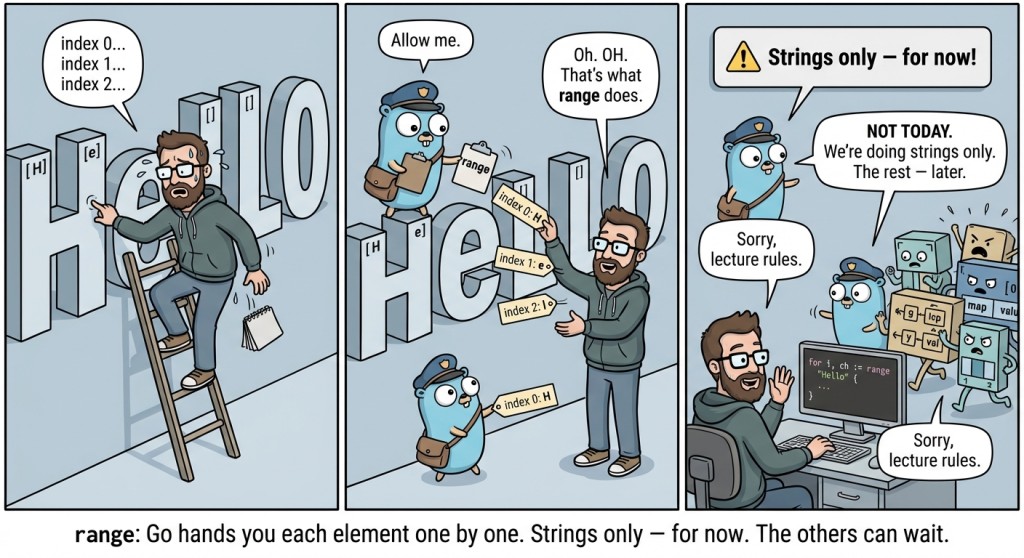
2. for range syntax: index and value
If the classic for is like “I control every iteration myself,” then range is “iterate this for me.” Visually it looks very simple, but there is an important detail: range usually yields two values. So we immediately practice reading them and not mixing up which is which.
The basic form is:
for index, value := range s {
    // ...
}
index is the position of the element in the string, and value is “the element itself” (for a string, that’s the numeric character code; we’ll talk about that shortly).
The very first example: what range gives us
package main

import "fmt"

func main() {
	s := "Go"

	for i, v := range s {
		fmt.Println(i, v)
	}
	// 0 71		  71 - code of the 'G' character
	// 1 111	 111 - code of the 'o' character
}
You can see two things here. First, i starts at 0. Second, v looks like some mysterious numbers. That’s not a bug; it’s a feature: for a string, range does not give a “piece of the string,” but the numeric value of the character.
3. index: why the index sometimes “jumps”
In a classic counter-based loop, the index usually goes 0, 1, 2, 3… and that feels natural: we manually do i++. With range you will often see 0, 1, 2, 3… too, but not always. And this is where it’s important not to panic and not to think Go is broken (it will break later, when you forget }).
index in range over a string is a byte position. While you work with Latin letters and simple characters, everything will look “even.” But as soon as the string contains characters that take more than one byte, indexes will stop increasing by +1.

Let’s not dive deep into encodings (so we don’t turn this into “UTF-8 in 15 minutes”), and just look at the effect. For example, a string like "Hello, 世界" often shows up in Go examples.
package main

import "fmt"

func main() {
	s := "Hello, 世界"

	for i, v := range s {
		fmt.Println(i, v)
	}
}
You will see that indexes for Latin characters go evenly, and closer to “世界” you may see jumps. For now, it’s enough to remember the practical rule: index is a position in the string, but not necessarily the “character number.” For tasks at today’s level, what matters is learning to use the loop form and the two values; we’ll leave the text nuances for later.
To make it easier on your brain, you can keep this mini schema in mind:
for i, v := range s {
    i = "where this is located inside the string" (position)
    v = "what character this is" (its code)
}
4. value: why it’s a number and what a “character code” is
When you print value from range via fmt.Println, you see a number. That number is the character code (in Unicode terms). In Go, the type rune is often used for such values. You can think of rune as a “number that stores a character.” Formally, it’s an alias for int32.
You don’t have to memorize the word int32 right now (you’ll see it later), but it’s important to understand the idea: range over a string yields a character as a number because a string internally is a sequence of bytes, and Go tries to be honest and efficient.
Single quotes are also a number
In Go, the literal 'A' is also a numeric character code. That’s convenient because we can compare value from range with such literals.
For example, let’s count how many times the letter 'o' appears in a word:
package main

import "fmt"

func main() {
	s := "gopher"

	count := 0
	for _, v := range s {
		if v == 'o' {		// 'o' character
			count++
		}
	}

	fmt.Println(count) // 1
}
Notice: we used _ instead of the index—because we don’t need the index. That’s an important topic in the next section, but you can already see how it makes the code cleaner.
A small detector for forbidden characters
Sometimes you need to check whether a string contains some character. This is a typical real-life task: “no spaces allowed in a password,” “no @ allowed in a name,” “no tab characters allowed in code,” and so on.
Let’s do a simple check: whether the string contains the '#' character.
package main

import "fmt"

func main() {
	s := "go#lang"

	hasHash := false
	for _, v := range s {
		if v == '#' {
			hasHash = true
			break
		}
	}

	fmt.Println(hasHash) // true
}
Here you can see a very useful combo: range provides convenient iteration, and break lets you exit early as soon as the answer is found. We’re not going into “big algorithms,” but you’ll see this pattern all the time.
5. _: ignoring values you don’t need
For Go beginners, the compiler often triggers both annoyance and respect at the same time. Annoyance—because “why is it complaining about nonsense?” Respect—because later you realize: it complains so you don’t shoot yourself in the foot, even if you really try.
One such “complaint” is the error about unused variables. If you write for i, v := range s, but only use v, the compiler will say: "i declared and not used".
And this is where _ comes in.
_ is read as “I don’t need this value, and that’s intentional.” It’s not a variable; it’s a special discard target for data.
Ignore the index, use only the value
The most popular option for strings: you more often need the character than the position:
package main

import "fmt"

func main() {
	s := "abc"

	for _, v := range s {
		fmt.Println(v)
	}
	// 97
	// 98
	// 99
}
Ignore the value, use only the index
Sometimes it’s the other way around: you need positions. For example, you just want to “loop N times” over the string length (yes, that happens too—for example, to print numbers).
It’s important to remember the rule: if you write one name in range, it will be the index, not the value.
package main

import "fmt"

func main() {
	s := "hello"

	for i := range s {
		fmt.Println(i)
	}
	// 0
	// 1
	// 2
	// 3
	// 4
}
This is where many people make a mistake: they write for v := range s and expect “characters,” but get “indexes.” So keep a simple hint in mind: “one name means index.”
6. Mini app: TextBuddy
So that range doesn’t remain “syntax for the sake of syntax,” let’s embed it into a small app that we can gradually extend in future lectures. Let it be a console helper called “TextBuddy”: it reads one word (no spaces), prints its length, and then prints a table “position → character code.” This simultaneously practices input/output and explains what exactly range provides.
Version 1: read a word and print len
package main

import "fmt"

func main() {
	var s string
	fmt.Scan(&s)

	fmt.Println(len(s)) // for example: 6
}
Yes, this is a very simple scaffold. But it’s exactly from such “bricks” that real programs are built later.
Version 2: add iteration via range
package main

import "fmt"

func main() {
	var s string
	fmt.Scan(&s)

	fmt.Println("len =", len(s))

	for i, v := range s {
		fmt.Println(i, v)
	}
}
If you input Go, the output will be roughly like this:
len = 2
0 71
1 111
And if you input something “not quite ASCII,” you may notice that len(s) and the number of iterations of range can behave unexpectedly. That’s normal: right now we’re locking in the mechanics of range, and we’ll dig deeper into strings and Unicode later. The main thing is that you can now read this code and write it yourself.
Version 3: a table and a character search
Let’s add two small improvements: make the output a bit clearer and add a check “does the word contain a dash '-'”.
package main

import "fmt"

func main() {
	var s string
	fmt.Scan(&s)

	hasDash := false

	fmt.Println("index code")
	for i, v := range s {
		fmt.Println(i, v)
		if v == '-' {
			hasDash = true
		}
	}

	fmt.Println("has '-' =", hasDash)
}
It’s still short, but it already looks like a “useful utility”: you can validate logins/identifiers that must not contain certain characters.
range is not just for strings
It’s very tempting to immediately say: “and range also works for arrays, slices, maps…”—and that’s true. But at this point in the course, we deliberately pause. Today we lock in range as a loop form and practice the skill: don’t confuse index/value, use _ correctly, and understand that the values might be “not what you expected.”
Just remember this phrase as a margin note: range is a universal iteration tool, but for now our world is a string. And that’s already enough to write useful code and not be afraid of other people’s programs.
7. Common mistakes when using range over strings
Mistake #1: expecting that for v := range s will produce “characters.”
This is probably the most common confusion. In the form for one := range s, the variable receives the index, not the value. As a result, you compare an “index” with 'a', nothing is found, and it seems like the program “doesn’t work.” The fix is very simple: either write two values (for i, v := range s), or explicitly use _ (for _, v := range s).
Mistake #2: declaring i, v, but using only one and getting a compilation error.
Go doesn’t like “dead” variables. If you wrote for i, v := range s, but never use i, the compiler will stop the build. This is not nitpicking: usually an unused variable is a sign of incomplete logic or a bug. If you truly don’t need the index, replace it with _.
Mistake #3: thinking that value is a string.
In range over a string, the value is a number (character code), not a substring. That’s why fmt.Println(v) prints numbers, which can be surprising. This is normal behavior: a string is bytes, and range yields characters as numeric codes. Formally, this is rune (an alias for int32).
Mistake #4: believing that index is the “character number” and always increases by 1.
For simple Latin letters, you will often see 0, 1, 2, 3… and get the impression that it will always be that way. But for strings with “non-trivial” characters, the index can jump. That doesn’t mean range is broken—it means the string is stored as bytes, and some characters take more than one byte (examples like "Hello, 世界" show this well).
Mistake #5: mixing up continue and state updates in more complex logic.
With range, you usually don’t update the index manually, but you still need to update state (flags, counters, “found/not found”). If you do continue too early inside the loop, you can skip the needed variable update and get the wrong result. A good technique is to keep variable updates close to the condition so it reads straightforwardly.

GO TO FULL VERSION