1. What is an API and why a service has two entrances
“Listen, okay. I need data about real tremors. Where are they even kept? Who knows?” Tommy leans back in his chair and scowls at the screen.
“Look,” Alex types. “Any program is constantly asking other things for something. Take the weather app on your phone — how does it know it is plus eighteen and rainy today? It does not measure the weather itself; it has no thermometer. It asks the one that does the measuring: some weather service, its computers. Earthquakes are the same. Geological services track them around the planet and publish them — for example, USGS, the United States Geological Survey. A real organization, real sensors. That is your source of real data — not ‘the internet in general,’ but a specific organization you can verify.”
“So everything we need exists somewhere,” Tommy mutters. “The stock market, the weather service… All that is left is to make them share.”
“So how do we take it?” he keeps going. “Do I go to their site and copy the table by hand?”
“And that is where it gets interesting,” Alex replies. “Any service usually has two different entrances. One is the website, for people. You open it and see a nice page: a map, icons, numbers. That is for your eyes. But a program does not need your eyes — it needs raw data. So there is a second entrance — the API.”
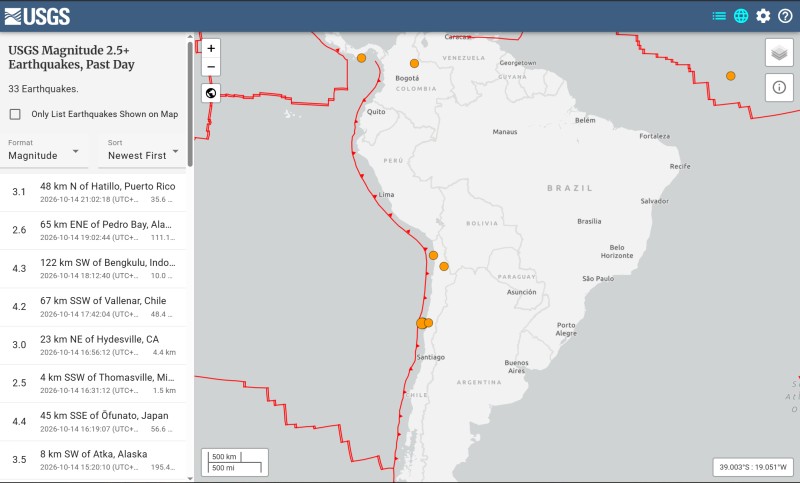
Entrance for people: the USGS website — an earthquake map, a list, pretty circles. This is for your eyes.
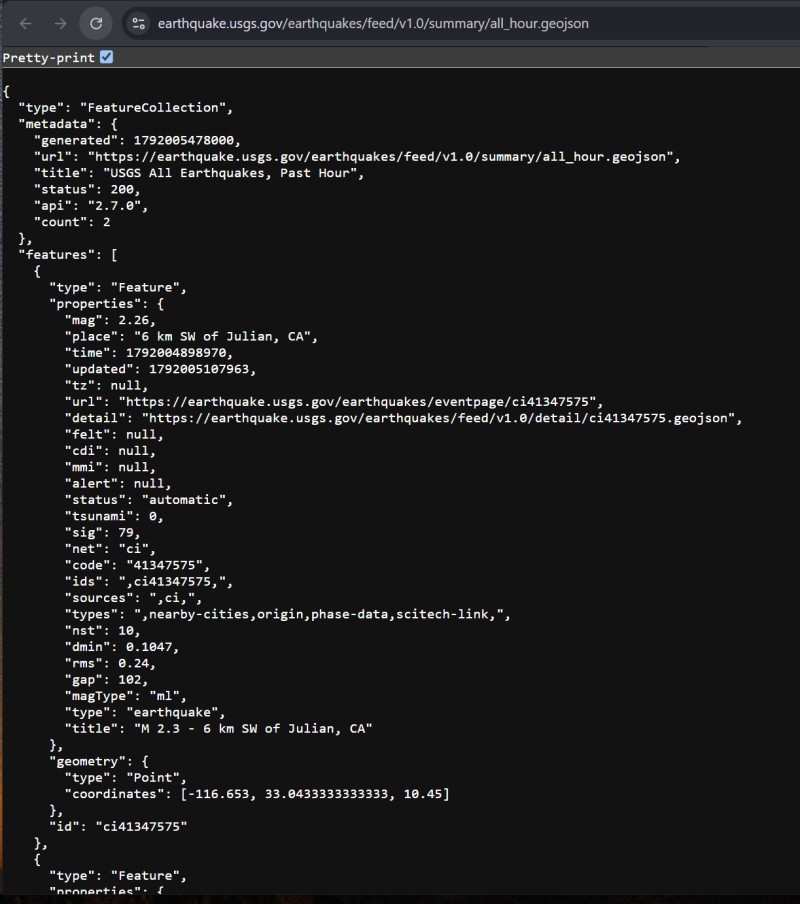
Entrance for programs: the same USGS via the API — the endpoint all_hour.geojson, which returns raw data in JSON.
And he comes up with an image right away:
“Imagine a big organization — a bank, a passport office. Inside there are lots of people, cabinets with folders. You do not go digging through all of that. You walk up to the window, say ‘I want this, here is my data,’ and you get the result. How things are arranged behind the wall is none of your business. You need two things: where to go and how to ask. An API is a window, only for programs.”
“So an API is a door, not the bank itself,” Tommy repeats slowly. “Behind the door there may be a thousand employees, and outside there is just a simple window.”
“Exactly.”
2. Endpoint, request, and response
“And ‘where to go’ — is that a specific address?” Tommy asks.
“A specific one. It is called an endpoint — the ‘end point.’ Just a string, very much like a website address. USGS, for example, has a public address for ‘all earthquakes in the last hour’:”
https://earthquake.usgs.gov/earthquakes/feed/v1.0/summary/all_hour.geojson“Looks like a link,” Tommy notices.
“It is a link. It just leads not to a pretty page, but to a window with data. And a service has lots of such windows: one for an hour, another for a day, a third for only strong tremors. Different endpoints mean different windows from the same organization. Remember the chain: service → it has an API → the API has endpoints → each one returns its own set of data. And do not mix up two things: an API is not a website, and an API is not ‘the internet in general.’ It is a specific door of a specific service.”
flowchart LR
  S["Service
USGS"] --> A["API —
a window for programs"]
  A --> E1["endpoint — tremors per hour
…/all_hour.geojson"]
  A --> E2["endpoint — tremors per day
…/all_day.geojson"]
  A --> E3["endpoint — strong ones only
…/4.5_day.geojson"]
  E1 --> D1["its own
data set"]
  E2 --> D2["its own
data set"]
  E3 --> D3["its own
data set"]
“And if I hit that address, will it send me some gibberish? Or Excel. What form does the data come in anyway?”
“Do not worry, no gibberish. Any conversation with an API is just two messages back and forth,” Alex types. “You send a request: ‘give me this.’ The service sends back a response: ‘here you go.’ That is all. By the way, you use this all your life — when the browser opens a page, under the hood it does exactly the same thing: ‘give me the page at this address.’ It is just that the response here is not an image, but data.”
sequenceDiagram
  participant P as Your program
  participant A as Service API
  P->>A: Request: “give me this” — at the endpoint address
  A-->>P: Response: “here you go” — raw data, not a picture
  Note over P,A: The browser does the same — only a page comes back in response
3. How to read JSON format
“So what form is the data in?” Tommy presses.
“Most often in JSON format. And do not get scared in advance — it could not be simpler. JSON is just neatly labeled text. Pairs of ‘name: value.’ Look.”
A small example lands in the chat:
{
  "name": "Hurrem",
  "age": 30,
  "city": "Istanbul"
}
“You can read it without any training: name — Hurrem, age — 30, city — Istanbul. Curly braces say ‘here is one card.’ And if there are many cards, they are put into a list, in square brackets. That is the whole JSON. This is not code that does something — it is just a way to write data down. Like a table, only in text.”
Next in the chat comes a real USGS response, trimmed so we do not drown in it:
{
  "metadata": {
    "title": "Earthquakes in the last hour",
    "count": 7                // number of events received
  },
  "features": [               // list of tremors; each item is one earthquake
    {
      "properties": {
        "mag": 4.2,                             // magnitude → marker size
        "place": "120 km SSW of Acari, Peru", // location → label
        "time": 1719230400000                   // when (special time format)
      },
      "geometry": {
        "coordinates": [-74.5, -15.9, 35.0]    // [longitude, latitude, depth_km]
      }
    }
    // ... six more like these
  ]
}
Tommy leans toward the screen, runs a finger along the lines, and freezes.
“Wait. Those are my fields! mag — magnitude, place — location, coordinates — coordinates. They really are here.”
“Exactly,” Alex replies. “Those exact fields you chose when you were figuring out what to show on the map — there they are. You decided in advance what to pull out, and now you just take it from features. And the data is real precisely because it is asked for from the one that collects it, not generated by somebody. And one honest gotcha for the future: in coordinates, longitude comes first, then latitude, not the other way around as we are used to saying. Mix them up, and the point will end up in the ocean.”
4. Access keys and API documentation
“Listen, why does USGS hand this out to everybody anyway?” Tommy is skeptical. “Or can any service be hit like that?”
“Not any,” Alex answers. “USGS is open, its window is keyless: walk up and take it, nobody asks who you are. That is no-key. Lucky us — they give us earthquakes for free. But not everyone does that. Many services want to know who is knocking on their door — so they can keep out just anybody, count the load, and sometimes charge money for volume. Then, when you register, they give you an access key, in English a token — a long string of letters and digits. Your personal pass, and you attach it to every request.”
“So do I have such a key?”
“Not for USGS, because it is open. You will need one when we get to a service that asks for a pass. And that will be soon. But for now, etch one thing into your memory for the future: an access key is like a password. Whoever gets it can use the service in your name, and if you are paying, on your dime. So you do not show the key to just anyone, and especially do not shove it into the first chat you find. Once we get to a live key, you will practice handling it properly.”
“Got it. A key is a password.”

“And how do people even know which organization has which addresses and what they return?” Tommy asks. “Where do you look for that?”
“In the documentation, docs. The service publishes it itself for those who want to work with it: here are the window addresses, here is what will come back, whether a key is needed. Like instructions for a device — do not guess, open it and look. A good habit is not to guess how someone else’s API works, but first to check its docs.”
“So now I know which window to walk up to and what they will put in my hands.” Tommy leans back in his chair.
“You do.” Alex nods. “All that is left is to figure out how to make the AI go to that window on its own instead of you copying things by hand. And how to reach what has no such convenient window at all. I will show you tomorrow — there is a really nice thing there.”

GO TO FULL VERSION