1. Taking a closer look at the Int type
If you want to store integers in variables, you need to use the Int type. Int is short for Integer (“whole” in English), which kind of hints that this type can store whole numbers.
Variables of type Int can store integers in the range from -2 billion to +2 billion. Or, more precisely, from -2,147,483,648 to 2,147,483,647.
Interesting fact
These “non-round” values are related to how computer memory works. In Kotlin (on the JVM), 4 bytes of memory are allocated for the Int type. Each byte of memory consists of 8 bits. Each bit can take only 2 values — 0 or 1. A variable of type Int contains 32 bits and can take 4,294,967,296 values.
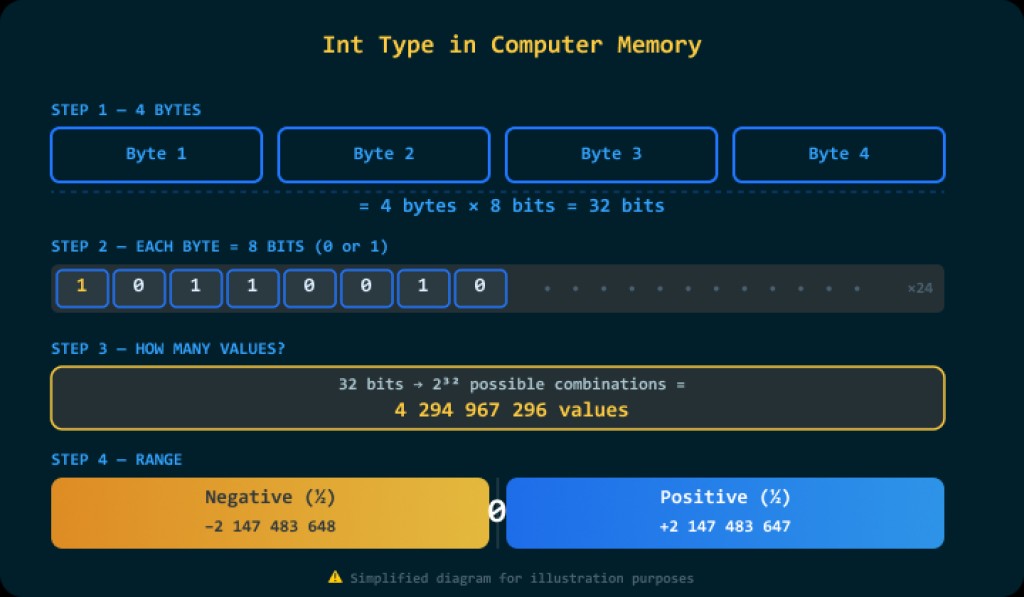
Half of this range is used for negative numbers, and the other half for positive numbers. That’s how we end up with exactly -2,147,483,648 to 2,147,483,647.
2. Creating a variable of type Int
The Int type is intended for storing integers. To create a variable in code that will be able to store integers, use a command of the form:
var name: IntWhere name is the variable name. Examples:
| Command | Description |
|---|---|
|
Creates an integer variable x |
|
Creates an integer variable count |
|
Creates an integer variable currentYear |
Letter case matters: the commands var color: Int and var Color: Int will declare two different variables.
But commands like Int Color and INT COLOR will not be understood by the compiler at all, and it will report an error. In Kotlin, you write var/val first, then the variable name, then the type after a colon :. The type is called Int and is written exactly like that (with a capital I).

3. Short syntax for creating variables
If you need to create many variables of the same type in one place in a program, in Java you can do it using a shortened comma-separated syntax.
int x, y, z;
In Kotlin, there is no such syntax: each variable is declared separately. If you want, you can write several declarations on one line by separating them with ; (a semicolon), but more often they are written on separate lines.
Examples:
var x: Int;
var y: Int;
var z: Int
or
var x: Int;
var y: Int;
var z: Int
4. Assigning values
To put a value into a variable of type Int, use the command:
name = valueWhere the value can be any integer expression. Examples:
| Command | Note |
|---|---|
|
|
|
The variable will contain the value “2 billion” |
|
The variable will contain the value “minus 10 million” |
|
Will not compile, because 3,000,000,000 is greater than the maximum possible value of type Int 2,147,483,647 |
5. Initializing variables
Creating (declaring) a variable and assigning it a value can be written as a single command. Most often, that’s exactly what you do, since a variable is usually declared when there is a need to store some value.
In Kotlin, it looks like this:
var name: Int = valueExamples:
| Command | Note |
|---|---|
|
|
|
The variable will contain the value “2 billion” |
|
The variable will contain the value “minus 10 million” |
|
Will not compile, because 3,000,000,000 is greater than the maximum possible value of type Int: 2,147,483,647 |
6. Evaluating integer expressions
On the right side of the assignment operator (the equals sign) you can have any expression — a combination of numbers, variables, and the operators +, -, *, /.
You can also use parentheses ( ). In Kotlin, just like in math, expressions inside parentheses are evaluated first, and then the outer ones. Multiplication and division have the same precedence, and it is higher than addition and subtraction.
Examples:
| Command | Note |
|---|---|
|
The variable will contain the value 8 |
|
The variable will contain the value 1 |
|
The variable will contain the value 6 |
|
Running this command will cause an error, and the program will terminate. |
Variables can also be used in an expression:
var a: Int = 1            // The variable a will contain the value 1
var b: Int = 2            // The variable b will contain the value 2
var c: Int = a * b + 2    // The variable c will contain the value 4
Moreover, the same variable can be on both the left and right sides of the assignment operator at the same time:
var x: Int = 5        // The variable x will contain the value 5
x = x + 1             // The variable x will contain the value 6
x = x + 1             // The variable x will contain the value 7
x = x + 1             // The variable x will contain the value 8
x = x + 1             // The variable x will contain the value 9
x = x + 1             // The variable x will contain the value 10
The thing is, in the Kotlin language, the = symbol is not a sign of equality, but a command that stores in the variable to the left of = the computed value of the expression to the right of =.
7. Integer division
In Kotlin, when dividing an integer by an integer, the result is always an integer. The remainder is discarded. In other words, the fractional part is dropped.
Examples:
| Command | Division result | Note |
|---|---|---|
|
2.5 | The variable a will contain the value 2 |
|
6.6667 | The variable b will contain the value 6 |
|
-1.2 | The variable c will contain the value -1 |
|
0.5 | The variable d will contain the value 0 |
8. Remainder of integer division
In addition to addition, subtraction, multiplication, and division, for integers Kotlin also has the “remainder” operator. It uses the percent sign — %. This is specifically the remainder of dividing an integer by an integer, not the fractional part.
Examples:
| Command | Division result | Note |
|---|---|---|
|
2 with remainder 1 | The variable a will contain the value 1 |
|
5 with remainder 0 | The variable b will contain the value 0 |
|
1 with remainder 4 | The variable c will contain the value 4 |
|
0 with remainder 1 | The variable d will contain the value 1 |
This is a very useful operator, and it is used quite often. For example, to find out whether a number is even or not, it’s enough to divide it by 2 and compare the remainder with zero. If the remainder is zero, the number is even; if it is one, the number is odd.
This check looks like this:
(a % 2) == 0Where, as you probably already guessed, a % 2 is getting the remainder when dividing by 2 (i.e., 0 or 1), and == is used to compare with zero.
9. Increment and decrement
In programming, you very often have to increase or decrease a variable by one. For these actions, Kotlin has special operators:
The increment operator (increase by one) looks like this:
a++This does the same thing as a = a + 1 — it increases the variable a by one.
The decrement operator (decrease by one) looks like this:
a--This does the same thing as a = a - 1 — it decreases the variable a by one.
Example 1
var x: Int = 5        // The variable x will contain the value 5
x++                   // The variable x will contain the value 6
x++                   // The variable x will contain the value 7
x++                   // The variable x will contain the value 8
x++                   // The variable x will contain the value 9
x++                   // The variable x will contain the value 10
Example 2
var x: Int = 5        // The variable x will contain the value 5
x--                   // The variable x will contain the value 4
x--                   // The variable x will contain the value 3
x--                   // The variable x will contain the value 2
x--                   // The variable x will contain the value 1
x--                   // The variable x will contain the value 0
x--                   // The variable x will contain the value -1

GO TO FULL VERSION