1. How memory is organized
Every computer has RAM. What is it, what properties does it have, and most importantly, what’s the benefit for us?
Every program (including programs written in Kotlin) is loaded into RAM before it runs. RAM contains the program’s code (which the processor executes) and the program’s data (which the program itself places into memory).
So what is RAM, and what is it like?
Imagine Excel 😎 An Excel sheet consists of cells, and each cell has its unique number (A1, A2, ... B1, B2). Knowing the cell number, you can always write some value into it or retrieve the value stored there. Computer memory is organized in a similar way.
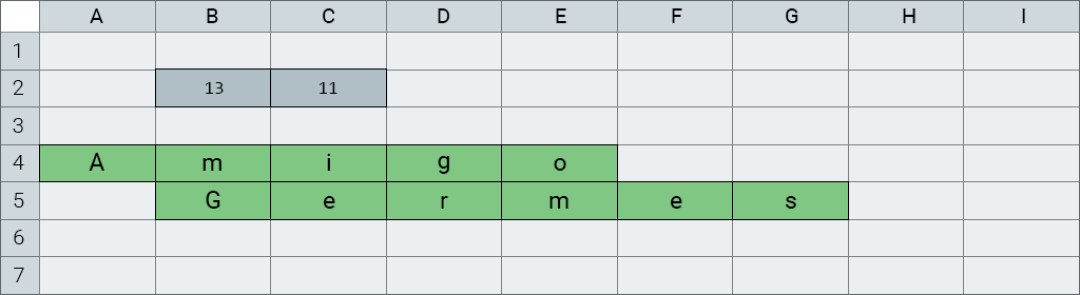
A program and its data are stored in memory while it runs. All computer memory is represented as small cells—bytes. Each cell has its unique number—0, 1, 2, 3, ... (numbering starts at zero). Knowing the cell number, we can store some data in that cell. Or retrieve it from there. Some cells store the program code—a set of commands for the processor—while others store the program’s data. The cell number is also called the cell address.
The processor can execute commands from a program loaded into memory. Almost all processor commands are something like: take data from certain cells → do something with it → put the result into other cells.

By combining hundreds of simple commands, we get complex and useful commands.
When a variable is declared in the program code, a chunk of still-unused memory is allocated for it. Usually this is several bytes. When declaring a variable, you must specify the type of information the program will store in it: numbers, text, or other data. Without knowing the type of information, it’s not clear what size memory block should be allocated for the variable.
At the dawn of the computer industry, programs worked directly with memory cell numbers, but later, for the convenience of programmers, cells started to be given names. A unique variable name is primarily for programmer convenience: while running, the program would handle numbers just fine.
2. Variables in memory
In Kotlin there are 4 main data types for storing integers. These are Byte, Short, Int and Long.
| Type | Size, bytes | Name origin |
|---|---|---|
|
|
Byte, because it occupies one byte of memory |
|
|
Short for Short Integer |
|
|
Short for Integer |
|
|
Short for Long Integer |
Also in Kotlin there are 2 floating-point types—Float and Double:
| Type | Size, bytes | Name origin |
|---|---|---|
|
|
Short for Floating Point Number |
|
|
Short for Double Float |
Each time program execution reaches the command to create a variable, a small memory region is allocated for it (the size depends on the variable type).
The address of a variable is considered to be the address of the first cell of the memory block allocated for it.
Kotlin programs are not allowed to access memory directly. All work with memory happens only through the virtual machine (JVM).
3. The String type in memory
The String type can store large amounts of data, so it’s not just a data type, but a full-fledged object.
The actual String data (text) is placed into a special object for which memory is allocated, and then the address of that object is stored in a variable, for which memory is also allocated.

- The variable a of type Int takes 4 bytes and stores the value 1.
- The variable b of type Int takes 4 bytes and stores the value 10_555. In texts, numbers are sometimes written as 10,555, where the comma is not the fractional part of the number but a digit grouping separator. In Kotlin code, you can use the _ character to group digits. The fractional part is separated by a dot.
- The variable d of type Double takes 8 bytes and stores the value 13.001.
- The variable str of type String stores the value D12—the address of the first cell of the object that contains the text.
The object of type String (containing text) is stored as a separate memory block. The address of its first cell is stored in the variable str.
4. What happens when we assign
Another important thing is how assignment works. For example:
fun main() {
    val a = 10
    var b = a
    b = 20
    println(a) // 10
}
In this example, two cells are created in memory: one for a and one for b. When we write b = a, the value is copied (10), not the “box” itself. Changes to b do not affect a in any way.
Now similarly, but with strings:
fun main() {
    val s1 = "Hello"
    var s2 = s1
    s2 = s2 + " World"
    println(s1) // "Hello"
    println(s2) // "Hello World"
}
Here both variables s1 and s2 refer to the same string "Hello" until the moment of change. But when we execute s2 = s2 + " World", a new string "Hello World" is created for s2, while s1 still points to the old string "Hello".
5. Why programming numbers everything from zero
People very often wonder why in programming it’s accepted almost everywhere to count from zero. The reason is that there are many situations where counting from zero is more convenient (although there are also situations where counting from 1 is more convenient).
I’ll try to come up with an analogy. Imagine you are standing in a long line at a store. Then the cashier says that all customers starting from the 20th should go to the second register. What numbers will they have? 20, 21, 22, 23, ... Makes sense. And relative to the 20th? 0, 1, 2, 3, ...
When we define a group as “the index of the first element” + “the count”, then inside the group the relative indices come out as +0, +1, +2, ...
In programming it’s the same. If your variable was allocated 100 bytes of memory and you have X—the address of the first byte, then what will the addresses of all bytes be? X+0, X+1, X+2, ..., X+99. And now we have a group of bytes with indices 0, 1, 2, 99.
When we think about a relative address within some data block, we always end up with numbering from zero. That is the first and most common reason for counting from zero.

GO TO FULL VERSION