1. The int type: the basic integer type
When you are just starting to program, the most common action is to calculate something: a sum, a difference, a quantity, a remainder, a size, an index. And this is where the int type comes in: it stores integers with no fractional part. In Go, this is the base and most popular type for counters and “regular numbers”, so today we will practice with it.
An important idea: int is about numbers you can imagine as “…, -2, -1, 0, 1, 2, …”. Negative values are allowed too. For example, the temperature can be -5, a balance can be -200, and your mood after three hours of debugging — well, you get the idea.
A technical note without going deep: the size of int depends on the platform (usually 32 or 64 bits). For learning tasks, it is enough to know that int works for most everyday calculations.
Mini-example: declared an int and printed it
package main

import "fmt"

func main() {
	var tasks int = 12
	fmt.Println(tasks) // 12
}
Note: we explicitly wrote int, but we could make it shorter using := (we covered that earlier).
package main

import "fmt"

func main() {
	tasks := 12
	fmt.Println(tasks) // 12
}
2. Operators +, -, *: addition, subtraction, multiplication
Now that we have numbers, we want to do what people tolerate math in school for: compute. In Go, the familiar arithmetic operators are available for int: + (addition), - (subtraction), and * (multiplication). They look exactly the way you expect, and they behave the way you expect too — one of the pleasant parts of the language.
An important nuance for beginners: Go has no “hidden magic” like automatic type conversions in arithmetic. If you have numbers, you are working with numbers. If you have strings, that is a different story, and we will cover string concatenation with + separately. Today, we keep the focus on integers.
Example: a “mini task planner”
Let’s imagine we have a plan for the day and some tasks already completed. Let’s count how many remain.
package main

import "fmt"

func main() {
	planned := 10
	done := 3

	remaining := planned - done
	fmt.Println(remaining) // 7
}

Now let’s add “productivity points”: suppose for every completed task you get 5 points. Let’s calculate.
package main

import "fmt"

func main() {
	done := 3
	pointsPerTask := 5

	points := done * pointsPerTask
	fmt.Println(points) // 15
}
Yes, it resembles an RPG. In a sense, programming works the same way: level up, collect artifacts, defeat bugs.
3. Operator /: integer division
Division is the most common “gotcha” for beginners, because your brain remembers school math, but the computer remembers data types. If you divide two values of type int, the result will also be int. And that means the fractional part is simply discarded. It is not rounded, not “kept somewhere nearby”, not hidden in a dark corner of the program — it is just not there.
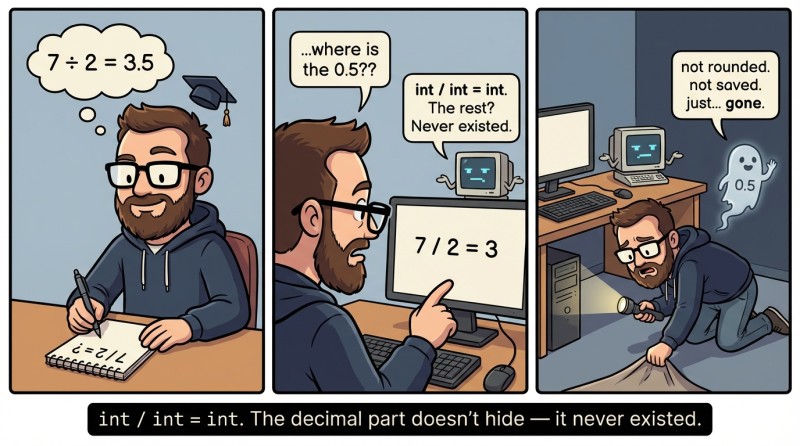
This behavior is called integer division. It is not “bad” or “good”: it is useful when you divide candies among kids or pages among chapters. But it can be surprising if you expected a fraction.
Example: “evenly” and “no change”
package main

import "fmt"

func main() {
	a := 7
	b := 2

	fmt.Println(a / b) // 3
}
Why is that? Because 7 / 2 with integers means “how many times does 2 fit into 7 as a whole”. Three times. The remainder is separate, and we have the % operator for that (coming up next).
Practical example: “completion percentage” without fractions
Percentages are often something you want to display nicely, but for now we are working only with int, so we will make a “whole percent”.
package main

import "fmt"

func main() {
	planned := 10
	done := 3

	percent := (done * 100) / planned
	fmt.Println(percent) // 30
}
What matters here is that we multiplied done by 100 before dividing, otherwise done / planned would yield 0, and everything after that would be sad and unrealistic.
4. Operator %: remainder of division
The % operator in Go is the remainder after division. It answers the question: “What is left when we divided as evenly as possible, without fractions?” If / gives us the “whole part”, then % gives us the “tail”. And that tail is incredibly useful: checking evenness, converting minutes into hours, distributing something “evenly”, and understanding what is left over.
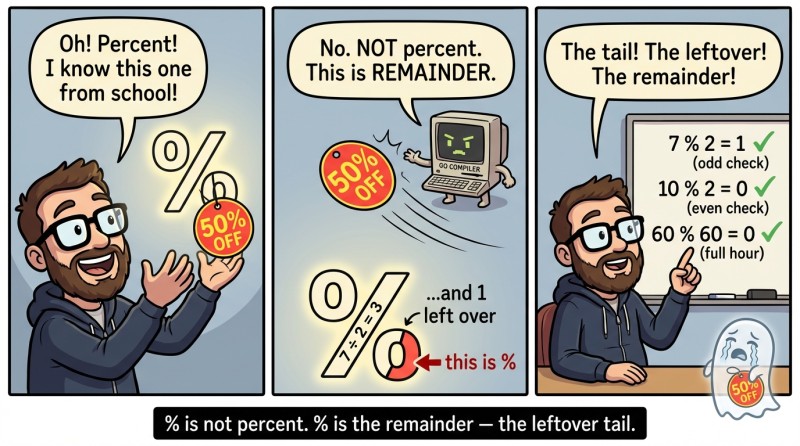
It is important to unlearn the association with “percent”. The sign looks like a percent symbol, but the meaning is different. In programming, % is remainder.
Example: candies and kids
package main

import "fmt"

func main() {
	candies := 17
	kids := 5

	each := candies / kids
	left := candies % kids

	fmt.Println(each) // 3
	fmt.Println(left) // 2
}
In plain language: “3 each, and 2 will be left”. And yes, this is how you suddenly become the person in charge of fair splitting in a group.
Example: minutes into hours and minutes
A classic task: you have a number of minutes and want to get “how many hours” and “how many minutes as the remainder”.
package main

import "fmt"

func main() {
	totalMinutes := 135

	hours := totalMinutes / 60
	minutes := totalMinutes % 60

	fmt.Println(hours, minutes) // 2 15
}
Note: we are not yet building a string like 2:15, because that is already a strings topic. Right now, what matters is the math: / gives “how many full hours”, % gives “how many minutes are left”.
5. Operator precedence: how expressions are read
When expressions get longer, the question appears: “What runs first?” Operators have precedence. In Go, as in regular math, multiplication and division are performed before addition and subtraction. And remainder % has precedence similar to * and /. This means the expression 2 + 3*4 will be evaluated as 2 + (3*4).
Beginners often get the “wrong answer” precisely because of precedence, and then suspect Go of conspiring. In reality, the conspiracy is simple: math.
Precedence table
| Operators | Example | Evaluated first? |
|---|---|---|
|
|
Yes |
|
|
No |
Example: one expression — two results
package main

import "fmt"

func main() {
	fmt.Println(2 + 3*4)     // 14
	fmt.Println((2 + 3) * 4) // 20
}
Parentheses are your way to say: “I know exactly what I want, and I’m asking the computer not to guess for me”. Even if you remember precedence, parentheses make code more readable. In production development, that is often more important than saving two characters.
6. Mini-project: splitting pizza and calculating progress
By now, we have enough tools to write a small program that looks like a “real application”, not just a set of disconnected calculations. We are not reading input yet; that will be a separate topic, so we will set values directly in the code. But we will practice + - * / %, precedence, and integer division.
The idea is this: we have a pizza cut into slices, we have a group of people, and we have a plan for “how many slices we can eat today so our conscience doesn’t call mom”. Let’s calculate portions, the remainder, and the percent of the plan.
Version 1: split evenly and compute the remainder
package main

import "fmt"

func main() {
	slices := 14
	people := 5

	each := slices / people
	left := slices % people

	fmt.Println(each, left) // 2 4
}
The result 2 4 means: “2 slices each, 4 left over”.
Version 2: add a “plan” and completion percentage
Suppose our plan is to eat no more than 10 slices as a whole group (the pizza is in danger, but we’re holding on).
package main

import "fmt"

func main() {
	plan := 10
	alreadyEaten := 3

	remaining := plan - alreadyEaten
	percent := (alreadyEaten * 100) / plan

	fmt.Println(remaining) // 7
	fmt.Println(percent)   // 30
}
Here we used several things at once: subtraction for what remains in the plan, multiplication and division for a whole percent, and also parentheses. In this case parentheses are not required, but they help readability.
Version 3: how many pizzas are needed given pizzaSize
Imagine we know in advance how many total slices we need for everyone (for example, 3 per person), and we want to understand how many whole pizzas to buy and how many slices will be left “for the morning” (morning, of course, will not come for everyone).
package main

import "fmt"

func main() {
	people := 5
	slicesPerPerson := 3
	pizzaSize := 8

	totalSlices := people * slicesPerPerson
	pizzas := totalSlices / pizzaSize
	left := totalSlices % pizzaSize

	fmt.Println(pizzas, left) // 1 7
}
We got 1 7: one whole pizza and 7 more slices on top. So in practice we need 2 pizzas, but here we run into the fact that we do not have conditions if yet. So for now we honestly show the result of division and the remainder. A bit later, when conditions appear, we will learn how to do “rounding up” in such tasks correctly and automatically.
7. Common mistakes when working with int and arithmetic
Mistake №1: expecting a fractional result from int / int.
It is very easy out of habit to think that 7 / 2 should yield 3.5. But if both numbers are int, the result is also int, and the fractional part is discarded. If you need “real fractions”, that is a separate topic, with different numeric types and different habits.
Mistake №2: forgetting operator precedence and getting “weird” answers.
The expression a + b*c is evaluated as a + (b*c), not as (a+b)* c. If the order matters, parentheses are your best friend. Even when parentheses are not required, they often make the intent of the code obvious and save you from mistakes when reading.
Mistake №3: confusing % with percentages.
The symbol looks like “percent”, but it is remainder. 17 % 5 is not 17 percent of 5 and not 5 percent of 17. It is “what is left when 17 is split by 5 evenly”. A very useful operation, especially in problems about even/odd checks, time, and splitting.
Mistake №4: accidentally dividing by zero (/ 0 or % 0).
Division by zero for int is not a “compile error”, but a runtime error (the program will crash). We do not have conditional operators yet to check the divisor neatly, so remember a simple rule: the divisor must be non-zero, and you must ensure that ahead of time.
Mistake №5: computing percent as done / total * 100.
With integer division, done / total often becomes 0, and everything after that also becomes 0. In integer arithmetic, you usually do the opposite: (done * 100) / total. This is not a “hack”, but a normal technique for working with int when you want a whole percent without fractions.

GO TO FULL VERSION