1. Introduction
When you write your first programs, they often look like a music box: you open it, and it plays the same tune every time. That is normal at the beginning, but pretty soon you want the program to respond to the user or to the input data from a problem statement: “enter two numbers — get the sum”, “enter a name — get a greeting”.
In Go (and in most learning problems), the main approach is to read values from standard input (stdin) and write the result to standard output (stdout).
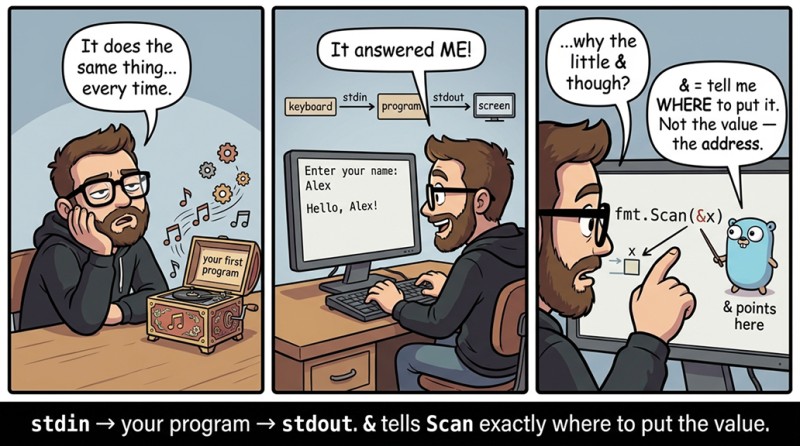
The main goal of this lecture is to make input predictable, so you understand exactly how many values you are reading, why & is placed before a variable, and what the two return results of Scan/Fscan mean.
How Scan sees input: spaces and newlines are separators
When you look at input data as a person, you see a “line”, a “paragraph”, “line breaks”. When fmt.Scan looks at it, it does not see “lines”; it sees a sequence of values separated by spaces and newlines.
That means for Scan there is usually no big difference whether 10 20 are on one line, or 10 is on one line and 20 is on the next—either way, it is two values.
flowchart LR
    A[stdin: '10  20 Bob'] --> B[fmt.Scan / fmt.Fscan]
    B --> C[token 1: 10]
    B --> D[token 2: 20]
    B --> E[token 3: Bob]
For a beginner, this is a very convenient model: you know in advance “I need 3 values”—so you call Scan in a way that makes it try to read exactly 3 values (or you make several calls).
fmt.Scan: read one value
Let’s start with the calmest variant: we enter one integer and print it back. This exercise is useful not because anyone needs an “echo bot”, but because it locks in the mechanics: the variable must exist beforehand, and Scan must be given “where to write”.
package main

import "fmt"

func main() {
	var n int
	fmt.Scan(&n)
	fmt.Println(n) // if you entered 7, it will print: 7
}
Two things are important here.
First: we declared n in advance using var n int. Input does not create variables; it fills already existing ones.
Second: we wrote fmt.Scan(&n), not fmt.Scan(n). And this & is the most common question at the very beginning of Go.
Important nuances about &x
If we explain it without pointer theory at all (and that is what we will do), then &n can be read like this: “I am giving the function the place where it should write the answer.”
Imagine that a variable is a box with the label n. If you call fmt.Scan(n), it is as if you are saying: “Here is what is currently inside the box.” But Scan does not need the current item in the box; it needs the ability to put a new item inside. So you pass not the contents of the box but its “address”, i.e., the box itself: &n.

A bit more technically (but still “everyday”): &n is the address of the variable n in memory. Go does not let Scan return values directly via parameters, so it writes into the variable through the address.
If you make a mistake and forget &, the compiler will usually say something like: “cannot use n (variable of type int) as argument… pointer expected”. This is one of those cases where the compiler complains for a good reason: it is literally saying “you didn’t give me the box, you gave me the number”.
Read multiple values at once
A very typical task format: “given two integers a and b”. Then the input looks like a b (or on different lines), and it is convenient to read both at once:
package main

import "fmt"

func main() {
	var a, b int
	fmt.Scan(&a, &b)

	sum := a + b
	fmt.Println(sum) // if you entered 10 3, it will print: 13
}
Here Scan will try to read exactly two values: first into a, then into b. So the order of variables must match the order of values in the input.
If the input is 3 10, and you do fmt.Scan(&b, &a), the program will not “break”—it will honestly read 3 into b and 10 into a. Only your expectation of the result will break (and that sometimes hurts more).
2. What Scan returns: (count, err)
Two results: how many were read and whether there was an error
Many Go functions return not one value but two (or more). fmt.Scan is exactly such a case: it returns the number of successfully read values and an error if something went wrong.
Why did Go do it this way? Because in Go, errors are values that you work with explicitly: you can return them, store them, print them, compare them to nil. This approach is known as “errors are values”.
Let’s look at it “head-on”, without any clever handling: we just read a number and print what Scan returned.
package main

import "fmt"

func main() {
	var x int
	count, err := fmt.Scan(&x)

	fmt.Println("count:", count) // e.g.: count: 1
	fmt.Println("err:", err)     // on success: err: <nil>
	fmt.Println("x:", x)         // if you entered 42, then: x: 42
}
How to read this.
count is how many values were actually recognized and written into variables. If you asked for one value, then with normal input count will be 1.
err is the error. If there is no error, err equals nil. This is an important detail: nil means “there is nothing”, in this case—“there is no error”.
Here we are not building complex logic of “what to do on error” (that will come later, when you learn conditional statements), but it is already useful to at least understand the diagnostics and not be scared of <nil>: <nil> is good news.
Why count is sometimes smaller than you expected
Sometimes this happens: you write fmt.Scan(&a, &b, &c), expecting three values, but the input provides only two. Or a word arrives instead of a number. Then Scan cannot correctly fill all variables.
At that moment, (usually) the following happens: count will show how many values were successfully read, and err will become non-nil (i.e., there will be some error).
Let’s model reading two numbers, but imagine that the input suddenly contains “10 kitten”.
package main

import "fmt"

func main() {
	var a, b int
	count, err := fmt.Scan(&a, &b)

	fmt.Println("count:", count) // most likely: count: 1
	fmt.Println("err:", err)     // will not be <nil>, it will describe the error
	fmt.Println("a:", a)         // a: 10
	fmt.Println("b:", b)         // b: 0 (will remain the zero value)
}
Why did b become 0? Because b was declared (var b int), and int defaults to zero; if input fails to write a new value, it stays “as it was”.
And once again: you do not have to build “proper” error handling yet. But you can already understand the behavior: “part of the input was read, then an error happened”.
Blank identifier _: when you do not want to store one of the results
Sometimes you do not need count. In most tasks of the form “input is guaranteed to be correct”, you truly do not use count, because you expect everything to be read normally.
In Go, it is idiomatic to show explicitly: “I am intentionally ignoring this result.” For that, there is a special name _ (underscore), called the blank identifier.
package main

import "fmt"

func main() {
	var n int
	_, err := fmt.Scan(&n)

	fmt.Println("err:", err) // on success: err: <nil>
	fmt.Println(n)           // for example: 5
}
Why is this useful, even if you are not handling errors yet? Because the code becomes more honest: you do not pretend that count matters, and you do not create variables “just in case”.
3. Panic in Go
Sometimes a Go program does not “return an error”, but terminates abruptly. This is called panic.
A panic is a signal: “something went so wrong that continuing execution is dangerous or meaningless”. Most often, a panic happens because of bugs in the code or serious failures in the data.
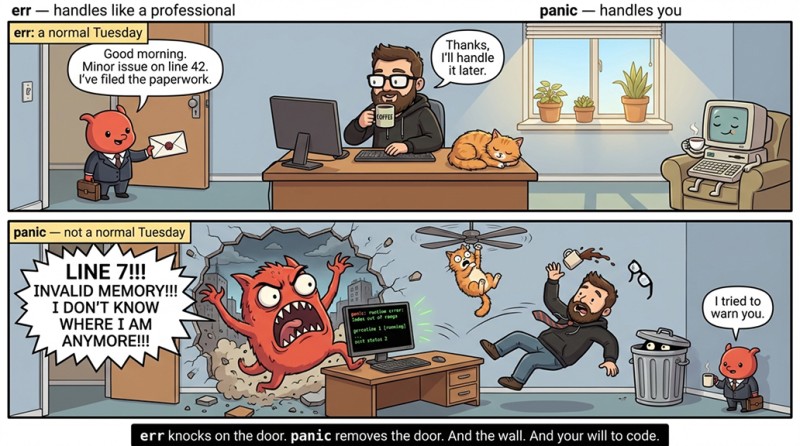
It is important not to confuse:
- err is a regular error; you can work with it: check it, print a message, return it upward.
- panic is a program crash: Go prints an error message, the place where it happened, and execution stops.
An example of a typical panic that beginners will see fairly early:
package main
import "fmt"

func main() {
	x := 10
	y := 0
	fmt.Println(x / y) // panic: runtime error: integer divide by zero
}
If you are familiar with the concept of exceptions, then panic is similar to an exception, but it is used for severe failures.
So if the program suddenly crashed and you see the word panic, it almost always means a logic error (or incorrect assumptions about the data). And fmt.Scan usually does not panic—it returns err, so you can handle the situation calmly.
4. fmt.Fscan: input with an explicit source os.Stdin
fmt.Scan is convenient because it reads from standard input “by itself”. But sometimes you need a bit more control: for example, you want to read not from stdin, but from another source (a file, a string, a network). Then you use fmt.Fscan, where the first thing is where to read from.
At our current level, it is enough to get familiar with the simplest variant: os.Stdin is the same standard input, just passed explicitly.
package main

import (
	"fmt"
	"os"
)

func main() {
	var a, b int
	fmt.Fscan(os.Stdin, &a, &b)

	fmt.Println(a * b) // if you entered 4 5, it will print: 20
}
From a practical standpoint, in learning problems Scan and Fscan(os.Stdin, ...) are often interchangeable. But the “idea” of Fscan is important: an input function can read not only “from the console”, and in Go this is done by explicitly passing the source.
If you see fmt.Fscan(...) in someone else’s solution, do not be afraid: it is the same Scan, just with the clarification “read from here”.
5. Mini app: “Bill calculator”
To reinforce input in the context of a normal program, let’s continue our small learning project (let’s call it calcbox). Before this, it could only print and compute with hardcoded values. Now it will read numbers from input and perform a calculation.
The scenario is simple: enter the price and the quantity, print the total cost. No percentages and no number-strings—everything is integer-based, so we do not mix topics.
package main

import "fmt"

func main() {
	// read
	var price int
	var qty int
	fmt.Scan(&price, &qty)

	// compute
	total := price * qty

	// print
	fmt.Println(total) // if you entered 120 3, it will print: 360
}
Notice how naturally the rules from previous lectures fit here. Variables are declared in advance, input goes through &, the computation is on a separate line, and output is at the end. Even if the program is small, this order keeps your brain from overheating.
If you want to add a debug mode to “see what was read”, you already know how to temporarily print count and err, and then remove it.
6. Typical input mistakes with fmt.Scan and fmt.Fscan
Mistake #1: forgot & before the variable.
This is the most common story. You write fmt.Scan(n) and expect n to be filled, but the compiler complains. The reason is simple: Scan needs somewhere to write the value, and without & you passed not the “place”, but the current contents. Think: “I pass the box, not the item in the box.”
Mistake #2: the variable is not declared before input.
Sometimes you want to write something like fmt.Scan(&x) without a prior var x int. But the function cannot write into a “variable that does not exist”. Declare first, then scan. At the beginning it is better to be a bit more verbose, but with no magic.
Mistake #3: the reading order is mixed up.
fmt.Scan(&a, &b) reads a first, then b. If the input order is different, the result will be “wrong”, even though the program formally works. This is an annoying class of errors: the code compiles, runs, but the answer is incorrect. It is fixed by paying attention to the input format and by using meaningful variable names.
Mistake #4: expected Scan to read an entire line including spaces.
Scan reads tokens separated by spaces. If you enter "John Smith", then only "John" will get into a string via Scan. This is not a bug; it is the rule. Right now, we are working with “words” and “numbers”, not with “whole lines of text”.
Mistake #5: ignore (count, err) and then spend a long time wondering why a variable stayed at zero.
Yes, many problems guarantee correct input. But when you debug your code or accidentally input something incorrect, err is the only hint about what happened. The “errors are values” approach exists precisely so you can see them and understand them.

GO TO FULL VERSION