1. Why do you need switch if you already have if/else
When you are just starting to write conditions, if/else seems like a universal hammer: you really can “nail down” almost any branching with it. But as soon as you have more than two or three options, the code starts to look like a stairwell with the lights off: you can get through, but you want to keep a hand on the wall. switch in Go is a way to make “choosing from options” more compact, readable, and straightforward.

switch is especially good when you have some value (for example, the command "add" or a day-of-week number), and you want to run different logic depending on that value. Instead of a long else if chain, you write one block where all options are visible at once.
Compare the “staircase”:
package main

import "fmt"

func main() {
	op := "*"

	if op == "+" {
		fmt.Println("addition")
	} else if op == "-" {
		fmt.Println("subtraction")
	} else if op == "*" {
		fmt.Println("multiplication")
	} else {
		fmt.Println("unknown operation")
	}
}
And the same idea using switch:
package main

import "fmt"

func main() {
	op := "*"

	switch op {
	case "+":
		fmt.Println("addition")
	case "-":
		fmt.Println("subtraction")
	case "*":
		fmt.Println("multiplication")
	default:
		fmt.Println("unknown operation")
	}
}
It reads easier: “switch on op, here are the options, here is default”.
2. Basic form: switch x { case ... }
From a syntax point of view, switch in Go looks scary only for the first ten seconds, until your brain recognizes the familiar curly braces. In the simplest form you have an expression after switch (for example, op), then a block that contains case and an optional default. Each case is “if the value matches, run this block”.
It is important to keep the model in mind: Go takes the expression after switch, compares it to the options in case, executes the first matching case, and exits the switch. There are no hidden “fall down by default” jumps “like in some other languages” here (more on that below in the section about fallthrough).
Mini example with a string:
package main

import "fmt"

func main() {
	role := "admin"

	switch role {
	case "admin":
		fmt.Println("full access")
	case "user":
		fmt.Println("regular access")
	default:
		fmt.Println("guest")
	}
}
Mini example with numbers:
package main

import "fmt"

func main() {
	day := 6

	switch day {
	case 1:
		fmt.Println("Monday")
	case 6:
		fmt.Println("Saturday")
	default:
		fmt.Println("some other day")
	}
}
In these examples, switch checks for equality. Meaning-wise, it is “a nicer set of if x == value”.
3. case and default: order matters
When you write switch, it is easy to start thinking of it as a “mapping table”. In general that is true, but there is an important nuance: options are checked from top to bottom, and the first matching case is the one that runs. For switch x (where the comparison is equality) this rarely causes surprises, because values are usually different. But it is useful to build the habit of “put the more specific one higher” right now—it will help with the switch { case cond: ... } form.

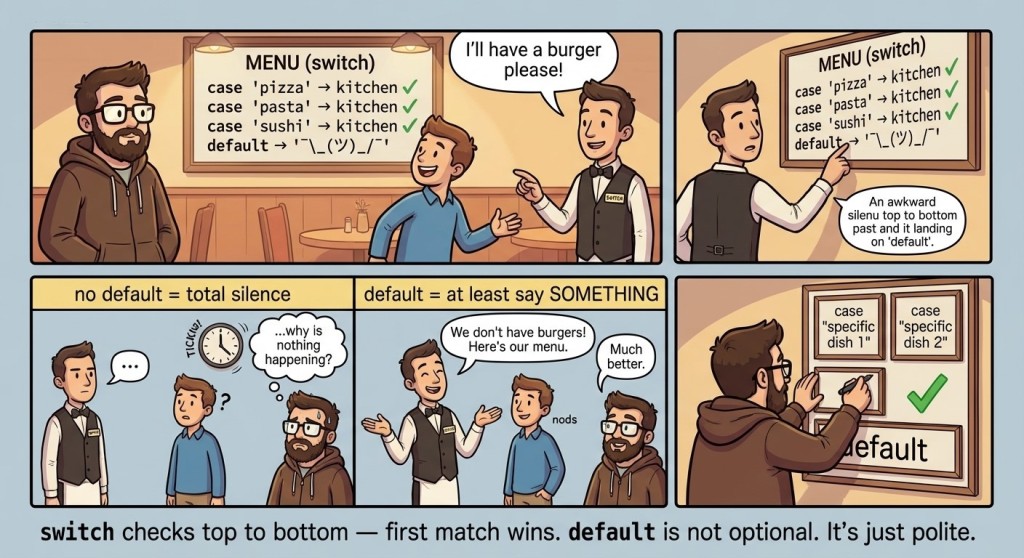
default is the “just in case” branch. It runs if no case matched. Formally, default is optional, but in practice it often makes a program friendlier: instead of silence or weird behavior, you explicitly say “I don't know this option”.
A small “command not recognized” example:
package main

import "fmt"

func main() {
	cmd := "dance"

	switch cmd {
	case "add":
		fmt.Println("addition mode")
	case "mul":
		fmt.Println("multiplication mode")
	default:
		fmt.Println("unknown command:", cmd)
	}
}
4. Multiple values in one case
Sometimes you have different values that should behave the same way. For example, the operations "+" and "add" are essentially the same: “add”. Or days of the week 6 and 7 are “weekend”. In such cases, switch lets you list multiple values separated by commas in one case.
This is useful for two reasons: (1) you don't duplicate the same code; (2) you explicitly encode “these values are one group”, so the reader doesn't have to guess.
Example with operations:
package main

import "fmt"

func main() {
	op := "+"

	switch op {
	case "+", "add":
		fmt.Println("we will add")
	case "-", "sub":
		fmt.Println("we will subtract")
	default:
		fmt.Println("operation is not supported")
	}
}
Example with weekends:
package main

import "fmt"

func main() {
	day := 7

	switch day {
	case 6, 7:
		fmt.Println("weekend")
	default:
		fmt.Println("weekday")
	}
}
Technically, it reads like: “if day equals 6 or 7”.
5. Why Go does not have fallthrough by default
If you have ever seen switch in C/C++/Java, you might remember a strange behavior: if you don't write break, execution “falls through” into the next case. This often creates bugs: someone adds a new case, forgets break, and everything breaks. Go decided: “let's not do surprises by default”. So in Go, switch executes exactly one case and exits.
The keyword fallthrough exists in Go, but we intentionally do not use it in a basic course: beginners rarely need it, and it more often hurts readability than helps. Much more important is to remember the simple rule: “one case—one entry—one exit”.
Let's mentally check this code:
package main

import "fmt"

func main() {
	x := 1

	switch x {
	case 1:
		fmt.Println("one")
	case 2:
		fmt.Println("two")
	default:
		fmt.Println("other")
	}
}
With x == 1, only "one" will be printed, and the program will continue without printing "two". That is the normal “safe by default” behavior.
By the way, switch is very often used in real Go code for “human-readable” representations of values: for example, inside the String() method of your own type, you can use switch and return strings for each option, and if the option is unknown—return a fallback text. Often there is a fallback via return fmt.Sprintf(...).
6. switch { case cond: ... } instead of a long else if
Sometimes you need to choose not by equality, but by ranges or conditions. A typical example is grading by score: “if >= 90—A, if >= 75—B, otherwise—C”. Of course, you can do this with else if. But Go has a very nice form: switch without an expression.
In such a switch, each case is a boolean condition. Essentially, switch { ... } means: “execute the first case that evaluates to true”.
Example with grades:
package main

import "fmt"

func main() {
	score := 82

	switch {
	case score >= 90:
		fmt.Println("A")
	case score >= 75:
		fmt.Println("B")
	default:
		fmt.Println("C")
	}
}
Pay attention to the order. If you put case score >= 75 above it, then with score == 92 you would get "B" (because the first true condition would fire). So here, order is meaning.
One more example, closer to “validation”: let's check a number for sign and parity:
package main

import "fmt"

func main() {
	n := -4

	switch {
	case n > 0 && n%2 == 0:
		fmt.Println("positive even")
	case n > 0:
		fmt.Println("positive odd")
	default:
		fmt.Println("non-positive")
	}
}
Yes, this could be written with if, but switch {} sometimes provides a cleaner structure: “a set of mutually exclusive rules”.
Mini diagram: how switch “thinks”
Before we move on, it is useful to formalize for a second what exactly happens when a switch executes. When you debug a program, it is easier for your brain if it has an “algorithm in your head” instead of the feeling “well, it's magic”.
flowchart TD
    A[Start switch] --> B{Is there an expression after switch?}
    B -- yes --> C[Compute value X]
    B -- no --> D[Assume X = true]
    C --> E[Check case from top to bottom]
    D --> E
    E --> F{Was the first matching case found?}
    F -- yes --> G[Execute its block]
    F -- no --> H{Is there a default?}
    H -- yes --> I[Execute default]
    H -- no --> J[Do nothing]
    G --> K[Exit switch]
    I --> K
    J --> K
This diagram works the same for switch x { ... } and for switch { case cond: ... } (there X is effectively true, and the cases evaluate to true/false).
7. Mini app: “CalcBox” using switch
Now let's take a small step toward applied code: we will add switch to a console utility. We are not building a full menu (that usually needs a loop), but even a single run of a program can be convenient: the user enters a command and two numbers, and the program chooses what to do. This is a very realistic pattern: one command—one action—one result.
Let's agree on the input format: first the command (op), then two integers (a, b). The command can be "add", "sub", "mul", "div", "mod". Division will be integer division, because for now we work with int.
Basic reading skeleton:
package main

import "fmt"

func main() {
	var op string
	var a, b int
	fmt.Scan(&op, &a, &b)

	fmt.Println("op =", op, "a =", a, "b =", b) // example debug print
}
Now let's add switch and compute the result. We'll do it like this: create a result variable, and in default say that the command is unknown.
package main

import "fmt"

func main() {
	var op string
	var a, b int
	fmt.Scan(&op, &a, &b)

	result := 0

	switch op {
	case "add":
		result = a + b
	case "sub":
		result = a - b
	default:
		fmt.Println("unknown op")
		return
	}

	fmt.Println(result)
}
Here is an important point: we used return to “exit the program” if the command is unknown. This is fine and readable: if we continue, we will print result, which will still be 0, and the user might think that 0 is the real answer.
Now let's extend the set of operations and show an example of “multiple values in case”: let "+" mean the same as "add".
package main

import "fmt"

func main() {
	var op string
	var a, b int
	fmt.Scan(&op, &a, &b)

	switch op {
	case "add", "+":
		fmt.Println(a + b)
	case "sub", "-":
		fmt.Println(a - b)
	case "mul", "*":
		fmt.Println(a * b)
	default:
		fmt.Println("unknown op")
	}
}
Note: this version looks fine even without result, because in each branch we print the result right away. This is a style question: sometimes it is more convenient to compute and then print, sometimes to print directly in the branch. The main thing is that the code stays transparent.
There is one potentially “dangerous” operation left: division. There is a risk of division by zero. We already have if and logic, so inside the case we can put a small check.
package main

import "fmt"

func main() {
	var op string
	var a, b int
	fmt.Scan(&op, &a, &b)

	switch op {
	case "div", "/":
		if b == 0 {
			fmt.Println("division by zero")
			return // finish main()
		}
		fmt.Println(a / b)
	default:
		fmt.Println("unsupported")
	}
}
Yes, inside a case you can write any code: if, multiple lines of computations, etc. switch does not limit the branch body.
8. When switch is better than if/else
After a few examples, it is easy to go to an extreme: “oh, switch is pretty, let's use switch everywhere”. That is a normal stage. But it is better to keep a couple of common-sense rules.
If you have two options, if/else is usually simpler. It is shorter and does not force the reader to “switch into switch mode”. If you have many options by equality to one value, then switch x usually wins in readability. If you have a set of ranges or conditions, then switch {} and else if are roughly equal, and the choice often depends on what reads better for a particular task.
To make it easier to navigate, here is a compact table (not as a law, but as a hint):
| Situation | Usually more convenient |
|---|---|
| 2 branches (yes/no) | |
| 3+ options for one value (op, role, status) | |
| Ranges and top-down rules (grades, categories) | |
| You want a mandatory “all other cases” | |
9. Common mistakes when working with switch
Mistake #1: expecting “fallthrough” into the next case as the default behavior.
People sometimes come from C-like languages and subconsciously think: “this case will run, and then it will continue”. In Go it does not work like that: one branch ran—switch is over. If you were counting on double execution, the program logic will be incomplete, and the bug will look like “why doesn't it print the second line”.
Mistake #2: forgetting to handle unknown values (default), and then being surprised by “silence”.
default is optional, and the compiler does not complain. But the user of your program can enter an unexpected option, and the program will simply do nothing. In console utilities this is especially annoying: a person entered a command—and the response is silence.
Mistake #3: mixing up the order of conditions in switch { case cond: ... }.
In switch without an expression, order is meaning. If you put a “wider” condition first (for example, score >= 60 before score >= 90), then “high” cases will never trigger. This is a typical bug that looks logical until you say it out loud: “the first true is executed”.
Mistake #4: duplicating identical branches instead of combining values in one case.
When "add" and "+" do the same thing, it is tempting to write two cases in a row with identical code. It works, but it increases the chance of mistakes during edits: you update one case and forget the second. It is much cleaner to list the values separated by commas in one case.
Mistake #5: using switch where you need an algorithm, not a choice among options.
Sometimes beginners try to express complex logic with switch, especially when conditions partially overlap. The result is a “combinatorial explosion”: many cases that are hard to validate. In such situations, it is often simpler to break the task into several ifs, or precompute boolean variables with meaningful names and then choose.

GO TO FULL VERSION