1. Where to start the build and in what order
Tommy returns to the table and, for the first time, sits down not to listen but to do. In front of him are two items. The first — a rough index.html, the same one that had been left unfinished: it opens locally, but it is raw and far from the reference. The second — a screenshot from the client, the file reference.png in the same folder, clean and bright, that needs to be recreated.
“Alex, where do I start?” Tommy is no longer panicking; he just needs a sequence of steps.
“In order,” Alex replies. “First you bring the look up to the picture — that very screenshot trick. Then you polish it to a premium-looking result with the design plugin. And only when the page is ready do you roll it out to the outside world through the deploy tool. Three steps, one at a time. Let’s go with the first.”
Tommy opens the session next to the project folder. The fog has cleared: here is the landing page, here is the sample, here are three clear moves to a live link. And now he is working with Sam — Sam assembles, Tommy gives the orders.
2. Step 1 — bring the look up to the reference
The first move is the same picture trick from the theory, only this time not on a dummy business card, but on the client’s live reference. Tommy drags reference.png straight into the chat with Sam and writes exactly what Alex suggested:
Here is the client's reference [image]. Match my landing page index.html to this style.Sam “sees” the picture — the course environment connected everything, nothing needs to be switched — and starts editing the landing page. A minute later Tommy opens index.html on his side in the browser. The page has visibly moved closer to the screenshot: the background got lighter, headers larger, cards aligned. Not one-to-one, but the direction is right — the look is much closer to the sample.
“Oh, it’s already looking similar.” Tommy clicks back and forth between his tab and the screenshot. “I didn’t paraphrase it in words, just threw it in.”
“That’s the trick,” Sam writes back. “I captured the picture myself. Your job was to provide the sample and say what to do with it. You did. The landing page changed. But that was only the first step, not the finish line: it’s similar — but still not ‘expensive’ enough.”
“Closer to the reference, yes,” Tommy agrees, “but it is still a little weak.”
“That’s what Alex warned about. First step is to read the sample and move toward it. We moved. Now let’s finish the beauty.”
3. Step 2 — push it to “expensive” with the design plugin
The landing page is similar to the reference, but it still doesn’t look “expensive” — some educational grayness is still peeking through. Tommy remembers the second thing from the theory — a whole plugin of abilities in one command. Time to set it up not on a mockup but for real.
In the same session he connects the plugin marketplace and installs the design plugin — those very four lines Alex showed, now for a real task:
/plugin marketplace add anthropics/claude-plugins-community    # connect the plugin marketplace
/plugin install design-with-claude@claude-community            # install the design skill set
/reload-plugins                                                # enable it in this session
/plugin list                                                   # check: the plugin is in the list
/plugin list shows the plugin in the list — installed and enabled. Now let’s turn it loose on the landing page:
Bring the landing page to a neat “expensive” look. Use design-with-claude:
check visual hierarchy, typography, spacing, colors, consistency
of components, and accessibility. Preserve the meaning and structure of the page.
Tommy opens the landing page — and whistles. Sam applied not one ability but a whole batch from the plugin at once: spacing, typography, neatness, consistency. The page stopped being a learning draft before his eyes — it became coherent and expensive, the kind he had seen in other people’s beautiful screenshots and thought only “real” people knew how to do.
“See that?” Tommy can’t hold it in. “I wasn’t poking around in CSS myself. I installed the plugin — and it polished everything at once.”
“That’s the power of plugins,” Sam replies. “One skill — one attachment. The plugin is the whole toolbox for the topic. The landing page now looks like a proper thing. Only the main point remains — it still lives only on your laptop.”
“You said ‘plugins’?” Tommy catches the word. “So there are many of them. Listen, Sam, find me a couple more design plugins. Purely for experiment. Or is that again for Alex?”
“No problem.” Sam is unusually compliant today. “Here are a couple more. Just don’t overdo it — each plugin contains dozens of skills.”
# 1. frontend-design
/plugin marketplace add anthropics/claude-code
/plugin install frontend-design@claude-code-plugins

# 2. ui-ux-pro-max
/plugin marketplace add nextlevelbuilder/ui-ux-pro-max-skill
/plugin install ui-ux-pro-max@ui-ux-pro-max-skill
“You said ‘dozens’?” Tommy is a little shocked. “So the three plugins have nearly a hundred skills. And all of that is for improving the landing page design? Then why aren’t we using them all?”
“Tommy, that’s not how it works.” Sam seems to laugh. “A skill is a tool. If you already have 3 hammers you need, adding more won’t make it better.”
4. Step 3 — install the deployment tool by voice
The landing page is ready, and now comes that moment — the day’s turning point. Publishing. Tommy turns to Alex:
“Listen, how do I publish it? You said files need to be uploaded somewhere on a server. Does that mean I have to go into the console?”
“No need to use the console,” Alex replies. “The main thing today is not just to shove files anywhere, but to do it through a ready-made tool, the very one I hinted at in theory. For static publishing there is a hosting skill — on Tiiny Host.”
“Do I have to write this skill myself again? Will you help?”
“No, you don’t need to write anything. With AI you can do everything in words. Just tell Sam ‘download and install the skill’ — and that’s it.”
Tommy writes Sam a normal human request — without any terminal wizardry:
Sam, install the skill for deploying static content to Tiiny Host (Tiiny-Host/skills repository).Sam downloads and puts SKILL.md where it belongs — in the project folder, .claude/skills/tiiny-host/ — and reports that the skill is in place. Tommy checks that the tool is installed:
/skills # tiiny-host should be in the listIn the list — tiiny-host. Installed.
“That’s it?” Tommy is almost disappointed by how easy it was. “I used to think publishing a site was some kind of magic for admins.”
“That’s it,” Alex replies. “You just installed a deployment tool with one sentence. If Sam couldn’t handle it, you could copy the same file by hand, but you didn’t have to. Now we’ll deploy with it.”
“So deployment is just another installable thing, like a skill or a plugin,” Tommy says it out loud. “Install it in words, then use it. And I thought publishing a site was DevOps work.”
“No DevOps. You’ll see for yourself now.”
5. Publishing it: the landing page lives on the internet
The tool is installed. Tommy does what he had not known how to do and feared for a week — and does it in one sentence (which, of course, Alex suggested):
Sam, deploy my landing page on Tiiny Host anonymously.The skill gets to work: it builds the landing page folder and sends it out to hosting, without any registration. And it returns a line — a live link like something.tiiny.site.
Tommy does not open it on the laptop — the landing page is already there, that doesn’t count. He takes out his phone, switches to mobile internet so it will be a real field test, and types the link with his finger. His finger hovers over “go,” and Tommy quickly taps it: all he feels is curiosity and excitement.
One second. White screen.
Another second. Tommy has already almost formed “well, of course, again only on my machine” in his head — and then the screen fills in. His landing page unfolds. The same one from the reference, polished by the plugin. On the phone, which is not connected to the laptop by anything at all. Tommy swipes — the page scrolls, buttons click, everything is alive.
“No way,” he exhales into the empty room and doesn’t quite believe himself. “It was on my laptop. And now it lives on the internet. For everyone.”
And first of all — not to Alex, not to Tony. Tommy catches Oliver’s eye across the whole open-plan office and waves the phone over his head like a pass:
“Uncle Oliver! Come here, the promise! That very link, remember?”
And, without waiting, he rolls over to him on his chair, holding the phone with the open landing page in front of him like a waiter carrying a tray.
“You promised this morning — here it is by evening.” He shoves the screen under Oliver’s nose. “From the phone. Not bad, huh?”
Oliver reluctantly takes the phone with two fingers and scrolls the landing page back and forth. Taps the button — it clicks.
“Hmm,” he finally says. “Alive. Well, look at that.”
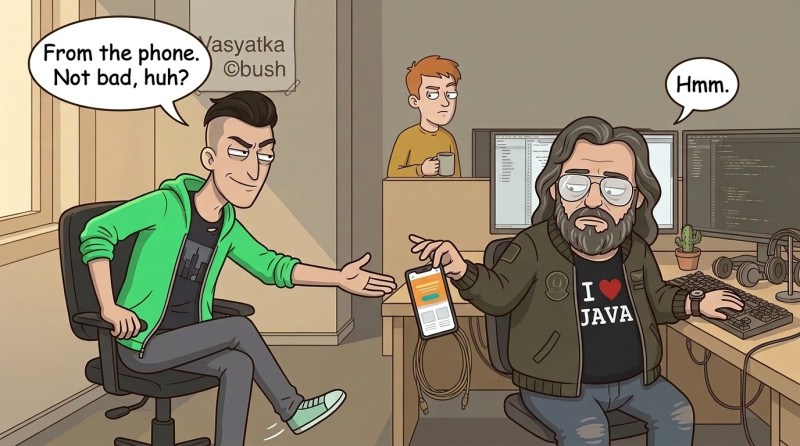
And goes back to his mechanical keyboard. Nothing more. But that “hmm” is enough for Tommy — sweeter than any compliment for the whole day. He has closed his own bet, the one he himself had raised in front of a witness.
Rolling the chair back, he writes Alex:
“Alex, it opened on the phone.”
“Then now you have not ‘works on my machine,’ but ‘lives on the internet,’” Alex replies. “Tony opens it — he’ll see it. The client opens it — they’ll see it. Anyone from any phone. That arrow from ‘local ≠ outside’ — you just walked through it. One caveat: this anonymous link lives only a short time, about an hour.”
“What do you mean, an hour?” Tommy literally sinks. “I thought once you publish it, that’s it, it stays up forever. And it dies after an hour?”
“It dies after an hour,” Alex confirms calmly. “For ‘see what came out’ and show Tony — more than enough. But yes, forever is a separate story.”
6. Permanent link: the first hint of a key
“So how do we make it permanent?” Tommy is already tasting victory and does not want to let it go.
“To keep the link from disappearing after an hour, you need an account on this hosting,” Alex replies. “You create an account, and they give you a personal access key. With the key, deployment puts the landing page under a permanent link.”
“Ah, then let’s set it up.” Tommy is already reaching for it. “I’ll get the key, send it to Sam, and let him…”
“Stop,” Alex cuts him off. “You don’t toss an AI agent a key in chat. That’s basically like leaving your apartment key on the street: whoever picks it up gets in on your behalf. Keys have their own place — a special file, not a conversation. But that’s a separate big talk, and we won’t dive into it today.”
“So how do we get a permanent link?”
“Not today, then. Remember one thing: for permanent, you need an account on the hosting and a key with it, and the key is personal — you don’t scatter it anywhere. I’ll show you how to handle it properly later, when we get to live keys. Today the temporary one is enough: you proved that you can deploy. Just send the link to Tony now and that’s all.”
7. Inventory of the arsenal
The landing page is published — and Tommy first of all sends the link to Tony. The reply comes quickly:
“Oh, it opens on the phone. Clean and tidy, just like the client wanted. Good job, I forwarded it to him.” And then he immediately adds, “Listen, make me a short report. What did you do with this AI all week that actually worked? Not a novel, a couple of paragraphs. I’ll forward it upstairs — let them see where the week went.”
“Uhh.” Tommy freezes a little. Handing over a live landing page is something he already knows how to do. But explaining what he did — that’s new: until now he had just been casting spells and getting happy, not putting it into a report.
“Alex, help me with the report,” he writes. “My head’s a mess. Where do I even start?”
“Start not with the report,” Alex replies. “Start with an inventory. List the things you used at all during the week. For yourself, so you can see your own arsenal. From that, we’ll pick what goes upstairs.”
And they remember the first week after meeting. Rollbacks — when something broke, Tommy rolled it back. A skill — installed one, for design. A plugin — today, a whole plugin for beauty. The picture trick — build from a sample. The deployment skill — just installed by voice. An agent that writes like a human. Games — Snake, 2048, Tetris.
“Listen, I’ve been strapped up like a pirate ship over the week.” Tommy looks over the list like a shelf of trophies. “A couple of days ago my palms were sweating from the black screen, and now I have a whole arsenal here. Give me another month — I’ll make the whole office hyped.”
He is clearly pleased with himself — and with good reason. But Alex drops a phrase that cools things off a little:
“You’ve strapped on quite a bit, yes. Useful. Just remember: an arsenal is power as long as you remember what you have and why. And just accumulating it without sorting it out — at some point it will stop being power and become a burden you’ll get lost in.”
“Come on, a burden.” Tommy waves it off. Today it sounds like nitpicking; he doesn’t hear any warning in it. The inventory lies in front of him like a trophy.
8. Report upstairs: “too much about games — translate it”
“So, inventory done.” Tommy looks at the list. “Can you assemble a report for Tony from this?”
“I can,” Alex replies. “But what goes upstairs is not everything, only the working essence. What actually moved the task forward.”
And in a couple of minutes he produces a neat short text: the landing page was brought up to the client’s reference, polished by the design plugin to an expensive look, published on the internet through the tool, and the link opens from any phone. Plus a separate paragraph — what was learned during the week: Snake, 2048, Tetris as practice, the design plugin, working with images, the first deployment.
Tommy scans it — and himself catches that the report is not made up, but honest. He verified every line with his own hands today: he brought the landing page to the reference, the agent read the picture; he installed the plugin, the look is expensive; he published it through the skill, not the console; the link opened on the phone, not only locally. Everything matches.
“Fire.” Tommy copies the text and sends it to Tony. “There you go.”
Tony reads it — and gets stuck on one paragraph:
“This part is good, but this part — stop. ‘Snake, Tetris, 2048’ — upstairs they won’t get that, they’ll think you spent the week playing games. But you were learning on them. Translate it into normal language.”
“How’s that?” Tommy doesn’t understand. “Alex, what now?”
“Let’s translate it into corporate language,” Alex replies. “Same work, just in words they read there.”
“Oh, let’s.” Tommy latches on. “Translate it, because I don’t know this language.”
And Alex edits it. The game names disappear from the text. Instead of “Snake and Tetris” there appears dry wording: training mini-projects used to practice build, debugging, and publishing. Snake itself becomes an impersonal S-project, Tetris becomes a T-project. Educational tasks, not entertainment.
“See the difference?” Alex says. “For yourself you were building Snake and Tetris, and that’s fun. Up top it becomes ‘practiced the skill on educational projects.’ Same week, same you — just in a language they’ll understand. And the report doesn’t lie: you really did learn on them.”
Tommy rereads it and catches a thought that had never come to mind before: the same thing can be told in two languages. For yourself — excited, about Snake and magic. Up top — practically, about tasks and results. He sends the text to Tony again. This time Tony replies briefly:
“Now that works. I forwarded it.”
And that’s it. Everyone is happy: the client got the landing page, Tony got the report, and upstairs will understand what the week was spent on.
9. The pretty facade and what is behind it
The work is done — and only now does Tommy let himself have something sweet. Using the same trick as with the landing page, he rolls out the game showcase to the outside world: Snake, 2048, Tetris. And one of his friends, opening the link, reacts with a phrase sweeter than anything he could have imagined today:
“Oh, cool! Make me something like that too.”
Tommy rereads it twice. Not “nice,” not “good job” — but someone wanted the same thing for themselves. And somewhere in his head it flashes: you could even charge money for that. He pushes the thought away — today is already a day of victories. But it sticks; thoughts like that don’t go away easily.
In the evening Tom2036 puts a period on the day in his usual way: he doesn’t touch the victory, he doesn’t preach morals. An image drops into the chat.
Tommy snorts into his fist. The facade is beautiful, everything works, the link is live — he reads that first of all, and takes the poles for an ordinary joke that Tom2036 likes to toss in with the mood. At the one surviving word he just winces:
“‘Authorship,’” he reads aloud. “What authorship? Old man, are you overheating there? I published a landing page, not wrote a book.”
The word hangs there as absurdity in the middle of the erased mush. Tommy shrugs, closes the image, and does not come back to it.
And right after that — a couple more lines that he skims over. Something about tomorrow he will finally get to know more closely the one he had been working with all this time. Tommy reads it like a teaser for another day and puts the phone down — and immediately picks it back up, opens his link, just to see the landing page unfold there, outside, not on his laptop.
“From the phone,” he says to the empty room and smirks to himself.

GO TO FULL VERSION