1. Introduction
A nested loop is when one loop lives inside another loop. It sounds like a nesting doll, and basically it is. Why do we need it? Because the real world is often “two-dimensional”: rows and columns in a table, coordinates on a grid, pairs of numbers (a, b) in the range 1..9, iterating combinations “everyone with everyone.” One loop is responsible for the outer “step,” the second—for the inner “filling” of that step.
The most important thing to understand at the start: nesting is not magic and not a separate language construct. It’s a regular loop, inside which you wrote another regular loop. And it executes predictably: the outer loop does one iteration—and within that iteration the inner loop runs through all of its iterations completely.
To avoid getting lost, think like this: the outer loop sets the “rows” (or “attempts,” or “the first parameter”), the inner loop sets the “columns” (or “the iteration within an attempt,” or “the second parameter”).
2. How nested loops execute and table output
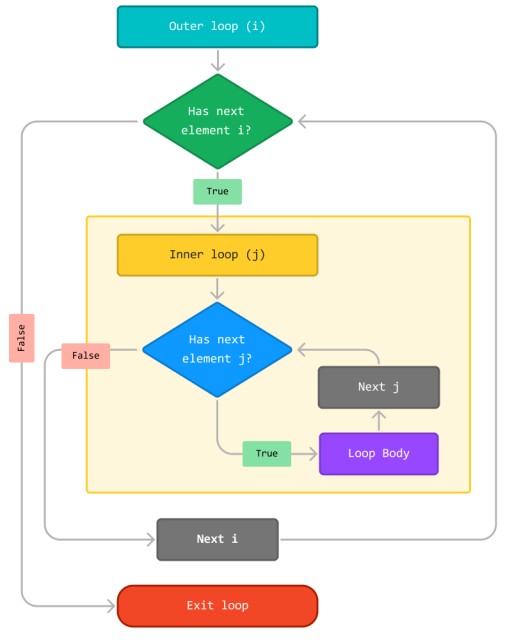
Execution model: outer step → inner run-through → next outer step
When you read nested loops, your brain first tries to imagine “two timelines at once” and starts overheating like a laptop on a blanket. A very simple model saves you: the outer loop makes one step, then the inner loop fully runs from start to finish, then the outer loop makes the next step, and the inner runs again in full. It’s like: “on each row, print all columns.”
Imagine a mini table (concept, not code):
| Outer row | Inner col runs through |
|---|---|
| 1 | 1, 2, 3 |
| 2 | 1, 2, 3 |
| 3 | 1, 2, 3 |
And here’s an important detail that will later become key for break: without additional tricks, break and continue apply only to the closest (innermost) loop. So “breaking the inner loop” is easy; “breaking both at once” already requires either a workaround or a label (labels).
Printing coordinates (row, col) as a grid
The most “honest” way to feel nesting is to print a coordinate grid. It’s so straightforward that it’s even pleasant: the outer loop prints rows, the inner prints elements of the row. Here it’s important to remember the difference between print() and println(): print() does not end the line, while println() does. We will print row elements using print(), and at the end of each row call println().
A small example:
fun main() {
    for (row in 1..3) {
        for (col in 1..3) {
            print("($row,$col) ")
        }
        println() // move to a new line after the row
    }
    // (1,1) (1,2) (1,3)
    // (2,1) (2,2) (2,3)
    // (3,1) (3,2) (3,3)
}

Here the outer row goes from 1 to 3. For each value of row, the inner col again goes from 1 to 3 and prints the pairs. And the println() after the inner loop is our “end of row” in the table sense.
If you accidentally put println() inside the inner loop, the “table” will fall apart: each element will be on a new line. This is not a compilation error—it’s a logical error, and it’s especially common among beginners because println looks more “normal” than print.
Drawing a rectangle with characters and a border
After coordinates, you want something a bit more “visual,” so nesting feels less like math and more like “drawing.” We won’t use graphics yet, but we do have a console and characters. Let’s make a rectangle out of "#", for example 4 rows by 6 columns. The outer loop is rows, the inner is columns, and for each column we print "#".
fun main() {
    val height = 4
    val width = 6

    for (row in 1..height) {
        for (col in 1..width) {
            print("#")
        }
        println()
    }
    // ######
    // ######
    // ######
    // ######
}
Now a small “meaning upgrade”: we can print a border, and dots inside. For this we need the check “are we on the boundary or inside.” The boundary is the first/last row or first/last column. Everything else is the interior.
fun main() {
    val height = 4
    val width = 6

    for (row in 1..height) {
        for (col in 1..width) {
            val isBorder = row == 1 || row == height || col == 1 || col == width
            print(if (isBorder) "#" else ".")
        }
        println()
    }
    // ######
    // #....#
    // #....#
    // ######
}
Yes, this already looks like “programming”: nested loops provide the shape, and if defines the rule for how to fill that shape.
Mini multiplication table with size input
The multiplication table is a classic. It’s great because it gives a clear goal: row * col. And nested loops are natural here: a row is multiplier row, a column is multiplier col. Also, it’s a good excuse to neatly build robust input: we’ll ask the user to enter the table size and repeat the prompt until they enter a valid number.
Let’s make a small piece of “our shared application,” and call it LoopLab: the program asks for the table size and prints a multiplication table.
fun main() {
    var size: Int? = null
    while (size == null) {
        print("Table size (1..9): ")
        val n = readln().trim().toIntOrNull()
        size = if (n != null && n in 1..9) n else null
        if (size == null) println("Please enter an integer from 1 to 9.")
    }

    for (row in 1..size) {
        for (col in 1..size) {
            print("${row * col} ")
        }
        println()
    }
}
This example intentionally prints without pretty alignment, because “column formatting” is a separate topic (and we’ll get to it later). For now, our goal is to see the nesting: one row produces a whole row of values row*1, row*2, …
3. Searching in nested loops: how to stop in time
Naive pair search and the break trap
Now let’s move to a more “algorithmic” (but still simple) part: nested loops are often needed not for a pretty table, but for enumerating options. A typical scenario sounds like: “find two numbers a and b from the range 1..9 such that a * b == target.” This is a search over a grid of options. And again: the outer loop iterates a, the inner loop iterates b.
Let’s start with a naive but very important example—it will show the main trap:
fun main() {
    val target = 12

    for (a in 1..9) {
        for (b in 1..9) {
            if (a * b == target) {
                println("Found: $a * $b = $target") // for example: 2 * 6
                break
            }
        }
    }
}
At first glance it seems: “we found it—we do break—so everything is over.” But no. This break ends only the inner for loop (b in 1..9). The outer for loop (a in 1..9) will keep running, and you will get multiple matches (for example 2*6 and 3*4 and 4*3 and 6*2), and sometimes you’ll get repeated messages even though you wanted to stop at the first match.
This is where we arrive at two strategies for stopping “two loops”: using a flag and using a label.
Stopping without labels: a found flag and checking in the outer loop
The “flag” strategy is the most straightforward and often the most readable for beginners. We create a variable found (usually of type Boolean), plus variables for the result (foundA, foundB). As soon as we find it—we set found = true, store the values, and exit the inner loop with a normal break. The outer loop either includes found in its condition, or it performs a break itself when it sees that found == true.
I’ll show a while version, because it’s convenient to strengthen the outer loop condition there:
fun main() {
    val target = 12
    var found = false
    var foundA = -1
    var foundB = -1

    var a = 1
    while (a <= 9 && !found) {
        var b = 1
        while (b <= 9) {
            if (a * b == target) {
                found = true
                foundA = a
                foundB = b
                break
            }
            b = b + 1
        }
        a = a + 1
    }

    println("Result: ($foundA, $foundB)") // for example: (2, 6)
}
The plus of a flag is that it doesn’t require any “special” constructs. The downside is that you must ensure the outer condition actually accounts for found; otherwise the outer loop will keep running and the whole point of the flag is lost.
4. Labels for break and continue
Labels in Kotlin are a way to “name” a piece of code (often a loop) and then refer to it in jump operators: break@name or continue@name. This is not an everyday tool, but sometimes it makes code shorter and clearer than flags.
The syntax looks like this: outer@ for (...) { ... }—this is a loop with the label outer. And you can exit it with break@outer.
An example of “found it—exit both loops immediately”:
fun main() {
    val target = 12
    var foundA = -1
    var foundB = -1

    outer@ for (a in 1..9) {
        for (b in 1..9) {
            if (a * b == target) {
                foundA = a
                foundB = b
                break@outer
            }
        }
    }

    println("Result: ($foundA, $foundB)") // for example: (2, 6)
}
Here break@outer ends exactly the loop labeled outer, i.e., the outer loop, and with it the inner loop stops as well, because we “jumped out” to the outside.
With continue@outer, the idea is similar: it means “move on to the next iteration of the outer loop.” This can be useful when the inner loop detects a condition that makes continuing the current outer a pointless. But I’ll be honest: continue@outer is harder to read than break@outer, and beginners usually find it easier to start with flags.
To avoid turning code into a quest, keep a simple taste rule in mind: if a flag makes the code clear—use the flag. If you end up with two or three flags and the logic starts to sprawl, while a label makes the code shorter and more direct—then a label may be justified.
A small table to help you feel the choice:
| Situation | Flag | Label |
|---|---|---|
| You need to “stop two loops” once | Often readable | Often shorter |
| For a beginner it’s important to understand “why it stopped” | Usually easier | Need to get used to break@name |
| The logic is complex and there are many flags | Can become a mess | A label sometimes saves the day |
5. Common mistakes
Mistake #1: expecting break to stop both loops.
This is one of the most common traps: break ends only the closest (inner) loop. As a result, the program continues the outer iteration and prints multiple “found” messages, even though you wanted only one. If you need to stop both, use either a flag in the outer condition or break@label.
Mistake #2: forgetting to print a newline after the inner loop in table output.
If you print row elements using print but forget println() after the inner loop, the whole “table” turns into one endless line. This is not a syntax error, so the compiler won’t help—only careful reading helps: “where does the table row end?”.
Mistake #3: putting println() in the wrong place—inside the inner loop.
The opposite problem: you put println() inside the inner loop, and instead of a table you get a column. Formally the program “works,” but the meaning is broken. A good self-check technique: the inner iteration should add an element to the current row, and the outer iteration should finish the row.
Mistake #4: you have a found flag, but the outer loop doesn’t account for it.
Sometimes people write found = true, exit the inner loop, but the outer loop keeps spinning because the outer condition doesn’t include && !found (or there is no if (found) break after the inner loop). As a result, the result variables may get overwritten, and the behavior becomes “random.”
Mistake #5: labels become “mandatory magic” and hurt readability.
Labels are a tool, not a lifestyle. If you put a label on every loop “just in case,” the code becomes harder to read: you get break@something where a plain break would be clearer. Labels work best when used sparingly—where they truly explain intent: “exit the outer search loop.”

GO TO FULL VERSION